Mobile wallet app industry overview
The mobile wallet app industry has been rapidly growing in recent years, as more consumers adopt digital payments and mobile devices become increasingly ubiquitous. A variety of digital wallet providers, such as PayPal, Apple Pay, and Google Pay, are playing a crucial role in this expanding market.
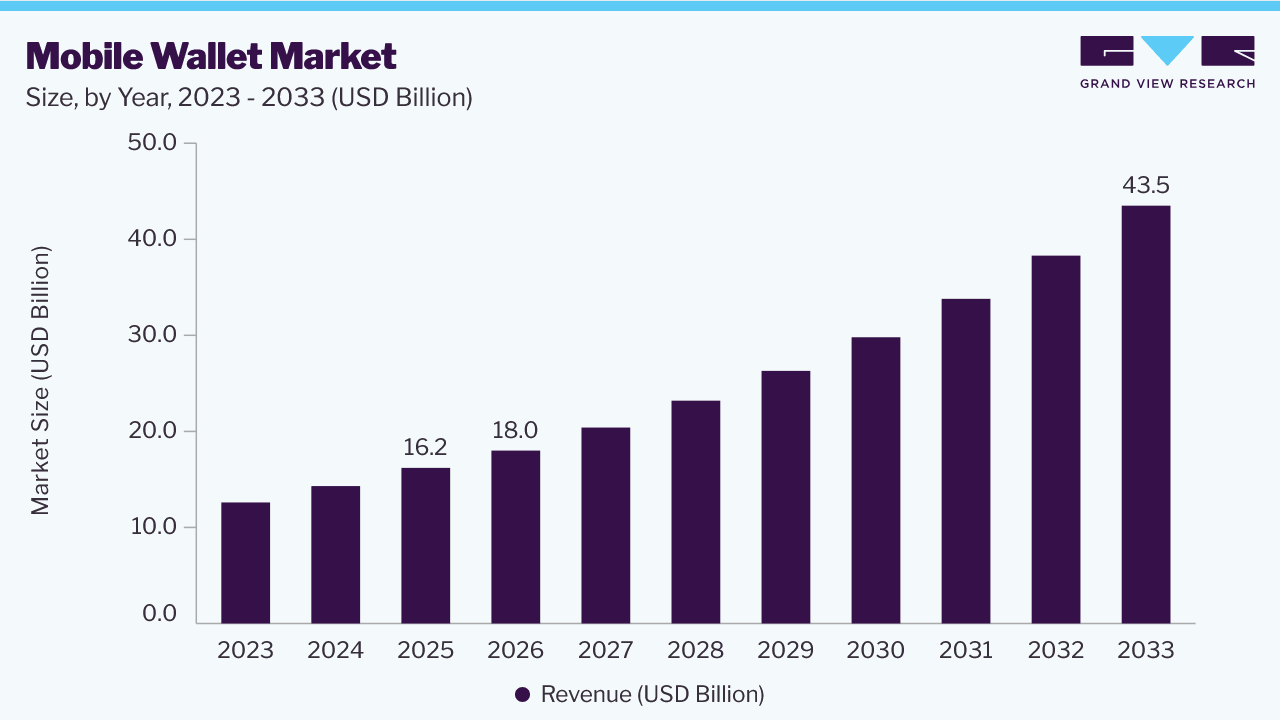
According to a report by Grand View Research, the global mobile wallet market was valued at $16.2 billion in 2025 and is projected to grow to $43.5 billion by 2033, at a compound annual growth rate (CAGR) of 13.4%.
The rise of mobile banking apps can be attributed to several factors, including convenience, security, and the increasing prevalence of contactless mobile payments. With mobile wallet apps, consumers can quickly and easily make payments from their mobile devices, without having to carry cash or cards. These apps also offer enhanced security features such as biometric authentication and encryption, which can help prevent fraud and theft.
In addition to traditional payment services, mobile wallet apps also offer a range of value-added services such as loyalty programmes, coupons, and budgeting tools. This has helped make mobile wallet apps more attractive to consumers and has contributed to their growing popularity. As the mobile wallet app industry continues to grow, it is likely that we will see continued innovation and competition in the space, as companies seek to differentiate themselves and capture market share.
What is a mobile wallet app?
A mobile wallet app is a digital application that allows users to store, manage and use their payment information for transactions on their mobile device.
This app essentially turns a mobile device into a digital wallet, allowing users to securely store their credit/debit card information, bank account details, and other payment methods.
With a mobile wallet app, users can make payments, transfer money, and manage their financial transactions without having to carry physical cash or cards. Mobile wallet apps also typically provide additional features such as loyalty programmes, coupons, and budgeting tools to enhance the user experience.
Why Building a Mobile Wallet App is a Smart Move?
Creating a mobile wallet app can bring numerous benefits to businesses and individuals alike. Here are some of the key advantages:
- Stronger customer engagement & loyalty. Mobile wallets make payments faster and more convenient, and features like rewards, discounts and personalised promotions keep customers coming back, naturally boosting retention.
- Lower transaction costs. Digital transactions cost less than cash or traditional payment systems – fewer fees, faster processing and no physical payment infrastructure to maintain.
- Better security & fraud protection. Encryption, biometric authentication and two-factor verification protect sensitive data and reduce fraud risk, building the trust customers need to transact confidently.
- Increased revenue through data insights. Wallet apps generate rich data on spending habits and preferences, letting businesses run targeted campaigns and personalised offers that drive more sales.
- Staying ahead of the competition. A mobile wallet adds convenience and innovation that sets a business apart, helping it attract and retain tech-savvy customers.
A mobile wallet app is a tool that can strengthen customer relationships, lower transaction costs, and support new revenue streams – while giving users a more secure way to pay. As digital payments continue to grow, businesses that build this capability now are better positioned to meet customer expectations and stay competitive.
How to create a digital wallet app?
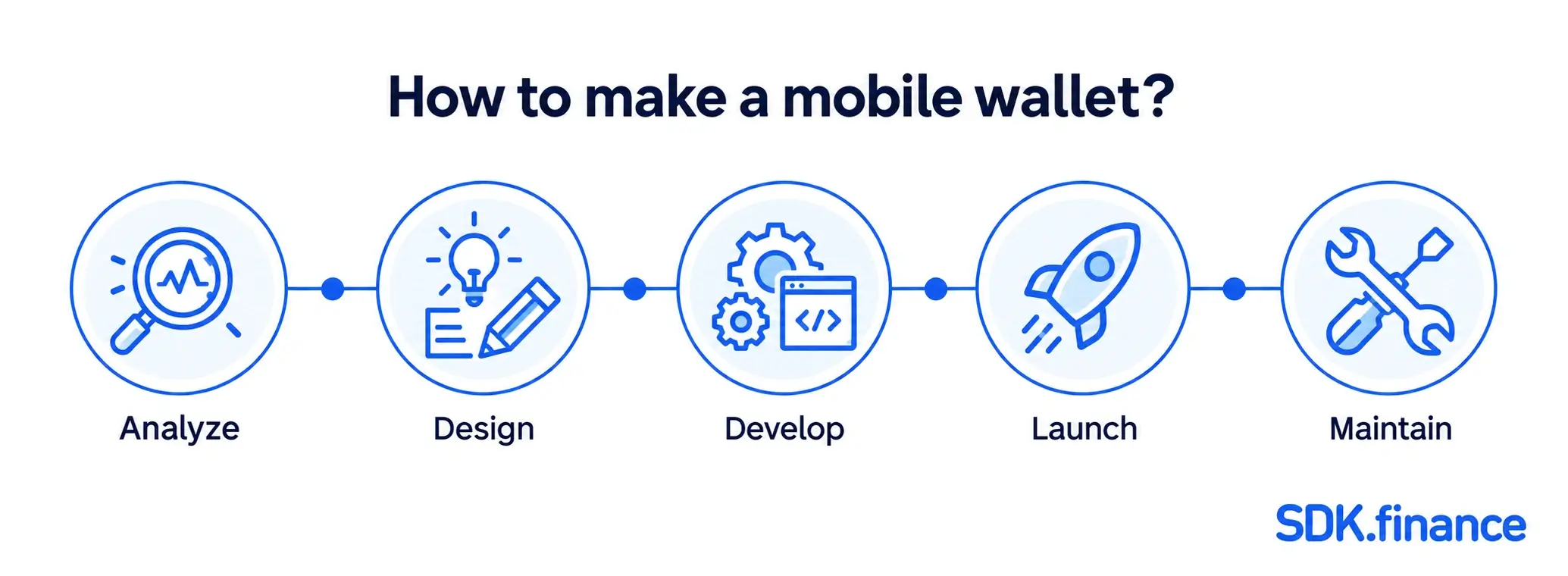
Digital wallet app development is a complex process that requires a range of technical skills and knowledge, including expertise in software development, security, and financial systems. In this guide we consider these steps from idea to launch that will tell you how to make a wallet app.
Discovery stage
Before beginning to design and develop a mobile wallet app, it is important to define the purpose and objectives of the future mobile app. This should include a clear understanding of what problem the app is trying to solve, and what specific benefits it will offer to users. This information will help guide the design and development process, and ensure that the app meets the needs of its target audience. The outcome of this stage is a documented MVP specification – a concrete feature list, target user, and success criteria – that the design and development teams can work from.
Compliance with legal requirements and standards
To create a reliable mobile wallet, it’s essential to ensure it is compliant with all the regulations. First of all, the software must comply with financial regulations such as Anti-Money Laundering (AML) and Know Your Customer (KYC) laws. Secondly, as the mobile application accepts, processes, stores, or transmits credit card data it must maintain compliance with the Payment Card Industry Data Security Standard (PCI DSS). It is also important to ensure that the app adheres to all relevant laws and regulations in the country or region it operates in, including licensing, taxes, and other legal requirements.
Market research
Another important step is market research, as it provides valuable insights into the competitive landscape and user preferences. It is crucial to understand the importance of compliance regulations for digital payment apps, as these applications must adhere to various legal standards set by central banks.
This research should include an analysis of similar mobile wallet apps, as well as an understanding of the broader digital payments industry. This step can help you understand what potential users are looking for in a mobile wallet app. This can include features like security, ease of use, and integration with other apps.
Design phase
Choosing a design approach
One of the key decisions to be made in the design phase is whether to use a native or hybrid approach. Native apps are built using the platform-specific programming language (such as Java for Android and Swift for iOS), while hybrid mobile wallet apps are built using web technologies (such as HTML, CSS, and JavaScript) and can run on multiple platforms. The choice of approach will depend on a variety of factors, including the target audience and the app’s specific functionality and requirements.
Creating wireframes and prototypes
Once the design approach has been chosen, the next step is to create wireframes and prototypes of the mobile wallet app’s UI and UX. Wireframes are low-fidelity layouts, while prototypes are interactive and closer to the final product – both are tested with real users to confirm the app is intuitive and easy to use. This step ends with a clickable prototype ready for stakeholders and a small group of target users to react to before development begins.
User experience design
User experience (UX) design is an important aspect of the mobile app’s design phase. This includes the overall look and feel of the wallet app, as well as the flow and functionality of the various app’s features. User testing should be conducted in order to ensure that the app is user-friendly and meets the needs of its target audience.
Development phase
Front-end and back-end development
The digital wallet development phase involves building the app’s front-end and back-end. The development team should work closely with the design team to ensure that the final product is consistent with the wireframes and prototypes.
What the wallet backend actually needs to do
Most of the visible work in building a mobile wallet app happens in the interface, but the backend is what makes the wallet trustworthy. At minimum, it needs to:
- Manage accounts and balances for each user
- Record every transaction as a debit and credit in a ledger
- Support the core money-movement operations: top-ups, withdrawals, transfers, and currency exchange
- Apply fees and limits that can be configured per user segment or contract
- Track a transaction status (created, pending, completed, failed, reversed), so the front end, the user, and your operations team share the same understanding of what actually happened
Not every capability needs to ship on day one. A typical MVP covers accounts, a single top-up method, internal transfers, and basic transaction history; multi-currency wallets, card issuing, cross-border remittance, and deeper analytics are commonly phased into later releases once the core is stable.
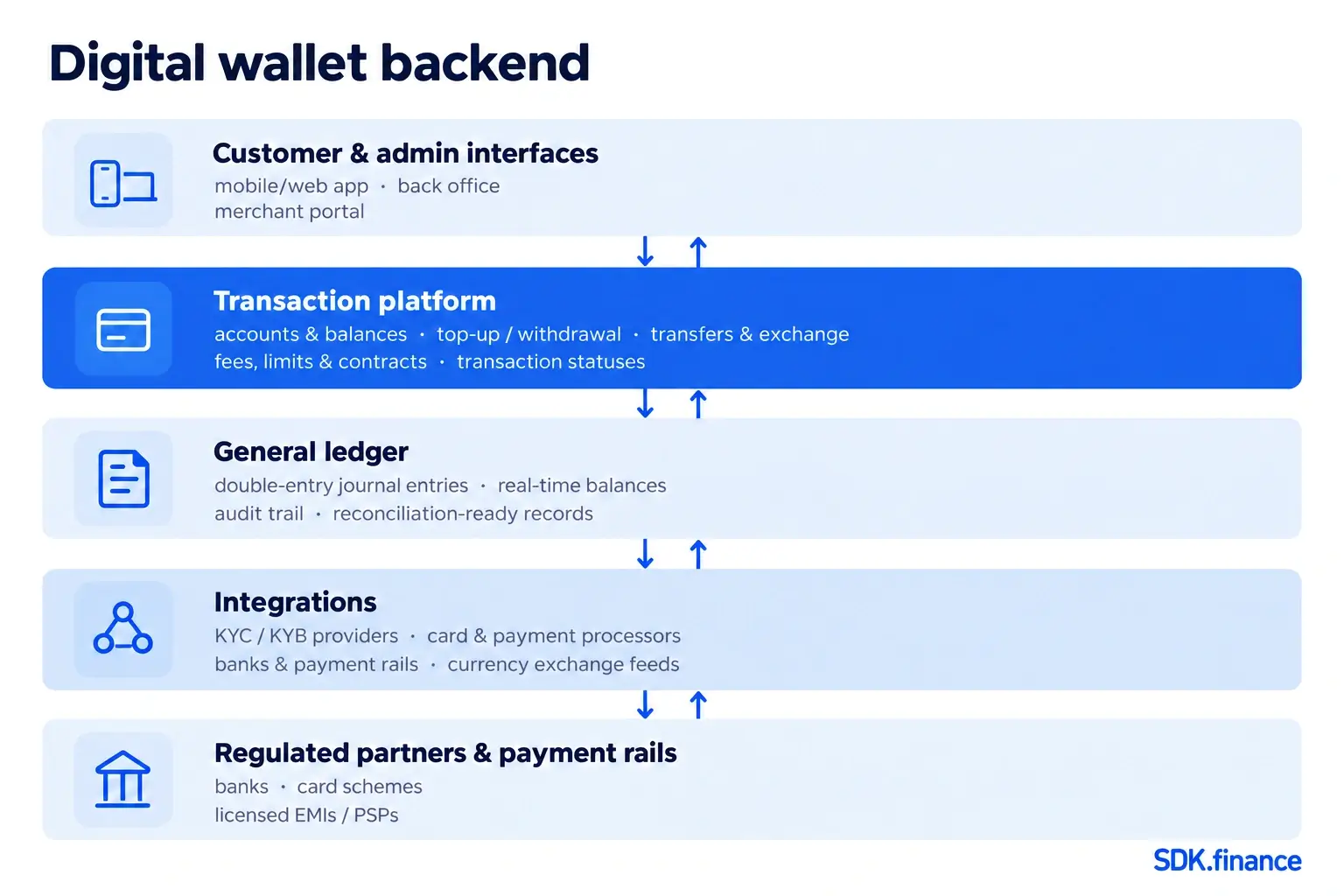
The diagram above shows how these pieces typically sit together: a transaction platform that manages accounts, wallets, and rules; a general ledger underneath it that keeps a double-entry record of every event; and an integration layer that connects both to KYC providers, card processors, banks, and payment rails.
Technology and Platform Selection
When creating a mobile wallet app, selecting the right technology and platform is crucial to ensure a secure, well-designed user experience. Here are some popular technologies and platforms for mobile wallet app development:
- Java and Kotlin for Android App Development. These programming languages are widely used for developing Android apps. They offer strong performance, security, and compatibility with a wide range of devices.
- Swift and Objective-C for iOS App Development. These languages are the standard for iOS app development. They provide high performance, security, and close integration with Apple’s ecosystem.
- React Native and Flutter for Cross-Platform App Development. These frameworks allow developers to build mobile wallet apps that run on both Android and iOS platforms using a single codebase. This can save time and resources while ensuring a consistent user experience across devices.
- Blockchain Technology for Secure and Transparent Transactions. Blockchain can enhance the security and transparency of transactions within a mobile wallet app. It provides a decentralised and tamper-proof ledger, making it ideal for financial applications.
- Cloud-Based Platforms for Scalable and Reliable Infrastructure. Cloud platforms like AWS, Google Cloud, and Azure offer scalable and reliable infrastructure for mobile wallet apps. They provide the necessary resources to handle large volumes of transactions and ensure high availability.
Consider key mobile wallet features
Another crucial step in creating an outstanding digital wallet is to implement necessary end-user features. It may be an informative transaction history, valuable rewards or convenient budgeting trackers. For example, with SDK.finance mobile wallet software you can provide users with expense tracking, helping them control their spending.
Integration of a payment gateway
This step includes the integration of a secure payment gateway, as well as features such as encryption, two-factor authentication, and fraud detection. This may include integration with third-party services or APIs, the development of additional payment methods, or other features that enhance the app’s overall value proposition. By the end of this step, you’ll have a fully integrated payment flow, documented end to end so every provider’s role and every data handoff is clear.
Security standards
To protect users’ personal and financial information, a digital wallet app needs several layered security measures: biometric recognition (fingerprint or face ID) or two-factor authentication to prevent unauthorised account access, encryption of data in transit and at rest, and regular security testing – including penetration testing and vulnerability scanning – to catch weaknesses before attackers do.
Building on a platform with independent security certifications – SDK.finance, for example, holds PCI DSS Level 1 Service Provider status and is ISO 27001:2022 certified for its information security management system – gives you a security-ready technology foundation, though these certifications cover the underlying platform and don’t by themselves certify your own product or guarantee against every incident.
Encryption and tokenisation are two key security features used by mobile wallet apps to protect users’ sensitive payment information. Tokenisation of payments is the process of replacing sensitive data, such as credit card numbers and PINs, with a unique identifier that can only be authenticated, decrypted and translated by the token provider.
For example, when the user makes a payment with the mobile wallet application, the tokenisation service provider creates a unique token or identifier for the card information, which is stored securely in its database, making transactions more secure.
Quality assurance and testing
Prevention is better than cure – thorough testing is one of the most important steps in mobile wallet creation, catching bugs and technical issues before they reach users. Documenting a test plan upfront – what gets tested, on which builds, and what counts as a pass – makes it easier to catch regressions before each release.
To deliver a reliable mobile wallet, teams typically run:
- Functional testing. Confirms the app works as intended, including UI, navigation, and transaction processing.
- Security testing. Checks for vulnerabilities such as data breaches, hacking, and fraud exposure.
- Performance testing. Verifies the app handles varying traffic and user loads without crashing or slowing down.
Pairing this with project risk management practices helps teams catch issues early and keep timelines on track. For instance, the SDK.finance mobile wallet platform is tested with JUnit, Arquillian, and OWASP’s security scanner, while our technical team checks code quality with SonarQube, UpSource, and FindBugs.
Launch the application
Launching a mobile wallet app requires careful preparation and planning. This includes developing a marketing strategy, creating promotional materials, and preparing the app for distribution on app stores. The app should be submitted for review well in advance of the launch date in order to ensure that it meets all app store guidelines and requirements. The outcome of this stage is a launch checklist – app store requirements, marketing assets, support readiness, and a rollback plan – confirmed before the release date.
How a bank launches a digital wallet in stages
For a bank, launching a digital wallet is less about a single release date and more about a phased rollout:
- Integrate & test. Connect the wallet to core banking, KYC, and payment-rail APIs in a sandbox environment.
- Pilot. Roll out to a limited group of real users and monitor closely.
- Operational readiness. Confirm support, monitoring, fraud, and compliance sign-off before expanding further.
- Phased rollout. Once the pilot holds up, expand access in waves – by branch, region, or customer segment.
- Full launch. Open the wallet to the entire customer base, with ongoing monitoring in place.
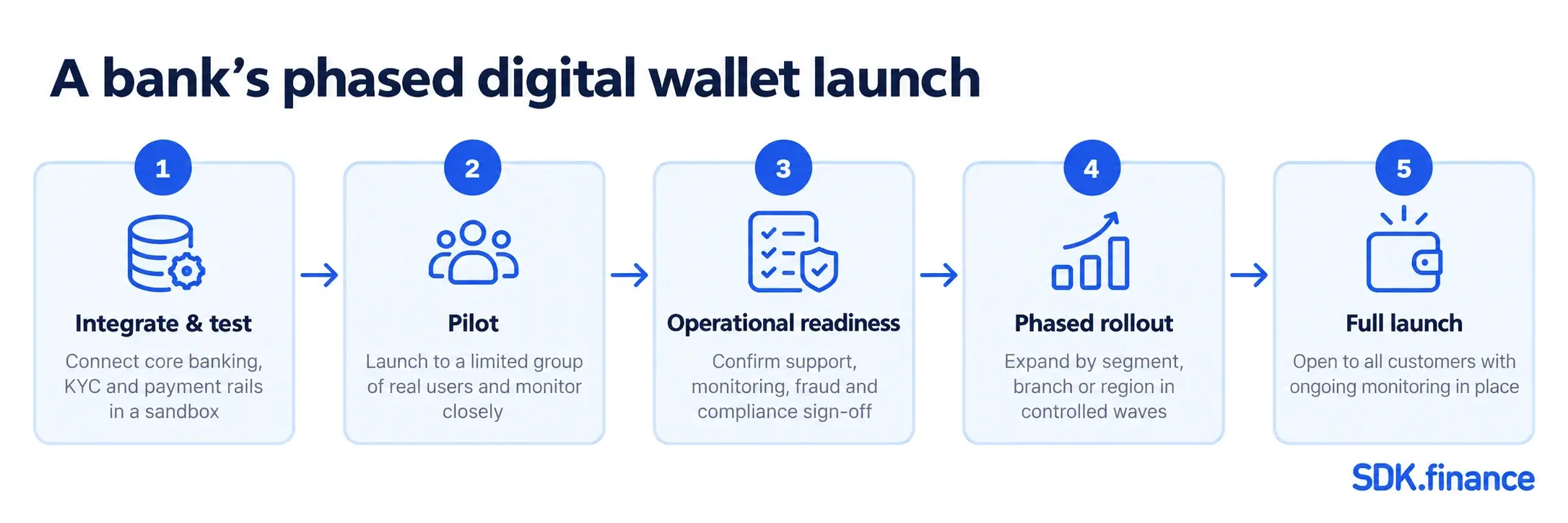
This staged approach limits the impact of any single issue and gives operations teams time to validate monitoring and support processes at each step before the next group of customers gets access.
Ongoing development and support
Maintain and update a mobile app
After the mobile wallet app is launched, it is important to continue to maintain and update it in order to keep it running smoothly and provide ongoing value to users. This includes focusing on digital wallet development, which is crucial for integrating key features, partnering with experienced developers, and managing the complexities involved in the development process. Additionally, fixing any bugs or issues that arise, updating the app’s functionality and features, and ensuring that the app remains compatible with new operating systems and devices are essential.
Get insights and optimise
Analytics and user feedback are valuable tools for measuring the app’s performance and identifying areas for improvement. Wallet app analytics can provide insights into user behaviour, engagement, and retention, while user feedback can help identify areas where the app can be improved or expanded. Setting up recurring performance and error monitoring alongside this feedback loop is what turns ad hoc bug fixes into a predictable maintenance and improvement cycle for each release.
How to build a mobile wallet on top of SDK.finance payment software
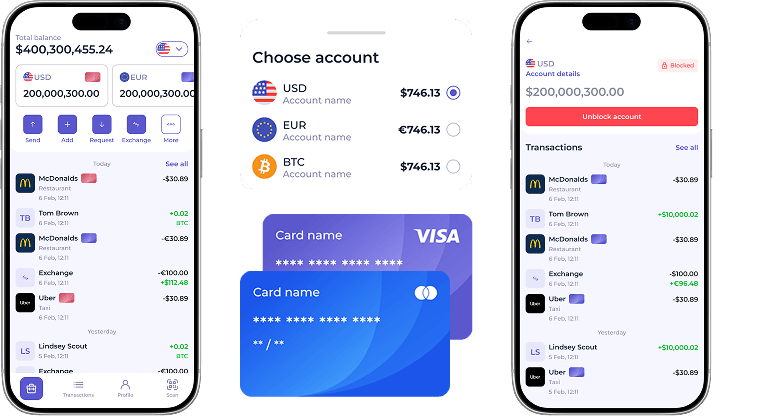
Building a mobile wallet requires more than a customer-facing app. You also need transaction processing, account and balance management, configurable fees and limits, operational workflows, security controls and connections to external financial-service providers.
SDK.finance provides this foundation through its Transaction Platform and customisable web, iOS and Android interfaces. The implementation process typically includes the following stages.
Configuring the infrastructure and services
The infrastructure setup depends on the selected delivery model.
With the SaaS model, the standard setup process covers development, pre-production and production environments. It can include the back-office and merchant portals, web and mobile interfaces, databases, messaging infrastructure, DNS, SSL certificates and application deployment.
With the Source Code Licence, your team or implementation partner deploys and operates the software in your own infrastructure. This gives you control over the source code, deployment architecture, data, integrations and future development.
Setting up development, pre-production and production environments
Each environment supports a different stage of the mobile wallet project:
- The development environment is used to configure the product, build integrations and test custom functionality.
- The pre-production environment is used to validate complete user journeys, provider connections, fees, limits and operational processes before launch.
- The production environment serves live customers and processes real operations.
For source-code development, Ubuntu Linux is the officially supported operating system. The documented local development setup uses a compatible JDK, Maven, Docker and Docker Compose. Backend infrastructure components include PostgreSQL, MongoDB and Kafka. The exact production architecture and resource requirements should be determined according to the expected transaction load, availability targets, security requirements and selected deployment model rather than treated as a fixed server specification.
System configuration
Once the environments are ready, the next step is to configure the wallet’s operating model. This normally includes:
- currencies and currency types
- customer accounts and balances
- providers and supported provider operations
- contracts or pricing plans
- fees, transaction limits and fee directions
- currency pairs and exchange-rate sources
- roles and permissions for operational teams
- trusted domains and access restrictions
- top-up, withdrawal, transfer and payment workflows
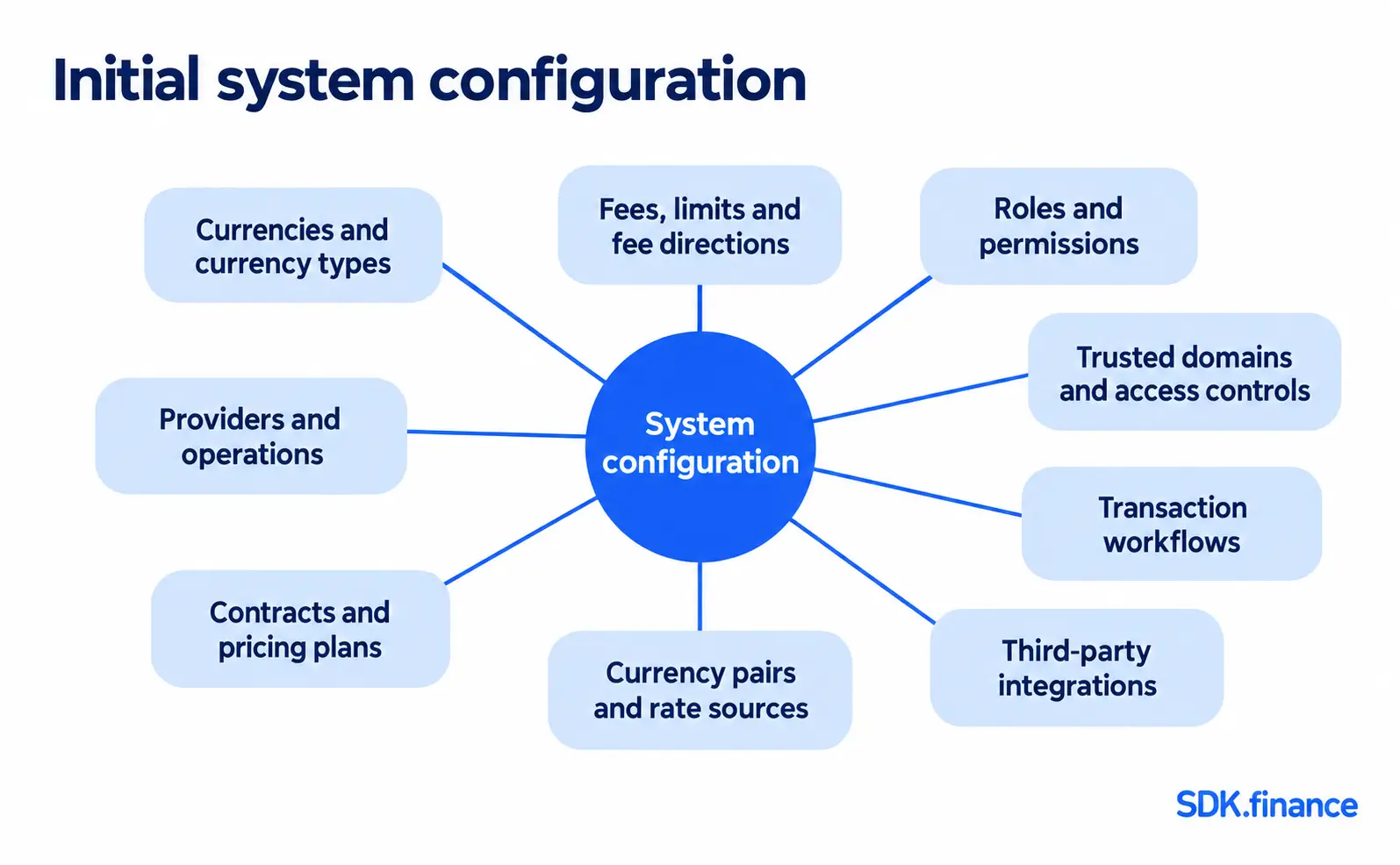
The configuration can be managed through the SDK.finance back office and, where supported, through authenticated APIs. Roles and permissions can be created for service users such as administrators, customer-support specialists, KYC or AML specialists, finance teams and other operational staff.
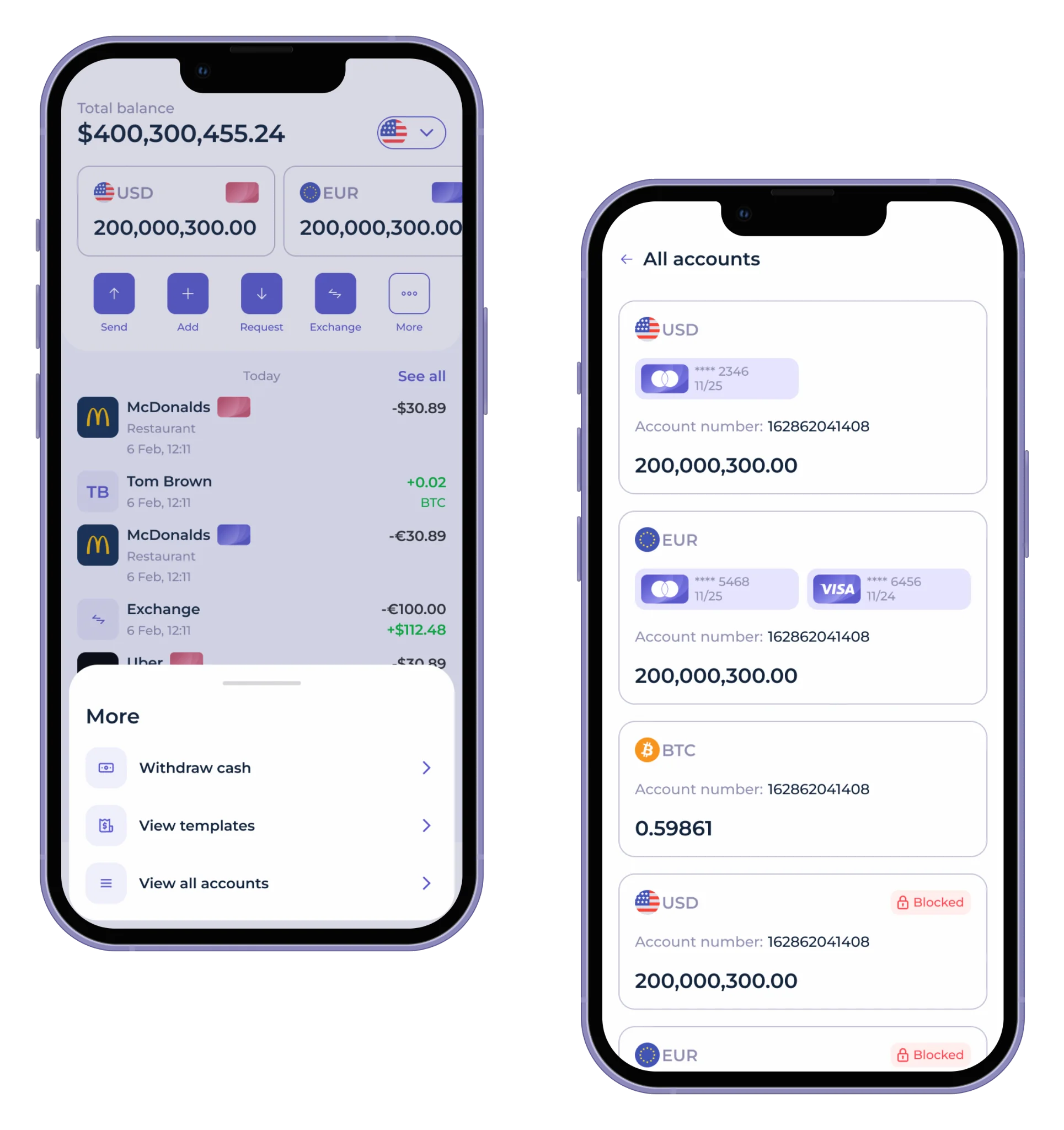
Watch the SDK.finance mobile app UI to see how the platform’s functionality can be presented through a mobile interface:
Currency creation
SDK.finance supports several internal currency types, including:
- fiat currencies
- cryptocurrencies
- bonus currencies
- virtual currencies
When creating a currency, administrators can specify its name, code, digital code, symbol, fractional units and serial-number prefix. They can also determine whether the currency is available for exchange, configure withdrawal limits and connect it to an external currency or asset provider when required.
After a currency is created, it must be added to the relevant provider operations and contracts before customers can use it in corresponding wallet flows.
Establishing currency exchange rates
Currency exchange is configured by creating currency pairs and assigning an exchange-rate source. Rates can be:
- entered and maintained manually; or
- obtained automatically from a connected external provider.
SDK.finance includes a documented pre-built Currencycloud integration for automated exchange rates. Using it requires the customer’s own Currencycloud account, agreement and credentials. The currencies, rate source, update settings and supported currency pairs must also be configured in the platform.
Configuring top-up and withdrawal
SDK.finance provides the transaction logic and operational workflows for several funding and withdrawal methods, including:
- top-up and withdrawal through an external provider
- top-up and withdrawal by bank transfer
- cash-desk deposits and withdrawals
Card top-ups and provider-based payouts require an appropriate payment provider to be connected and configured. The platform can calculate fees, create and track the transaction, send it to the selected provider and process the provider’s callback before updating the wallet balance.
Bank top-up and withdrawal requests can be managed through the back office. Operators can review relevant customer, account, bank and transaction information and approve, decline or otherwise process a request according to the configured workflow.
The final set of available methods depends on the product’s geography, regulated partners, provider agreements and integrations. SDK.finance supplies the software workflows but does not itself provide banking, payment or cash-handling services.
Setting up contracts and commissions
Contracts define the commercial conditions applied to different customer segments. SDK.finance documents four contract types available in the standard configuration:
- Base
- Standard
- Gold
- VIP
Contracts can be created for individual, merchant and business organisations. Administrators can configure monthly fees, make a contract available or hidden from customers, designate a default contract and add provider or system operations.
Fees can be configured by currency, operation, amount range and validity period. Supported fee types include:
- zero
- fixed
- percentage
- fixed plus percentage
- greater of fixed or percentage
- lesser of fixed or percentage
Fee direction determines who pays the charge. Depending on the operation, the fee may be deducted from the recipient, added to the sender’s amount or shared between the parties. Shared fees apply to transfers.
Limits can also be applied to individual operations. The documented options include maximum transaction amount, number of transactions and transaction volume, with daily, weekly, monthly or yearly periods.
Customising the UI
SDK.finance provides ready-made web interfaces and customisable iOS and Android applications for individual and business customers. These interfaces can be adapted to the project’s branding, supported languages, customer journeys and enabled functionality.
Documented mobile capabilities include:
- customer registration and KYC journeys
- individual and company profiles
- multi-currency accounts
- transfers and payments
- top-ups and withdrawals
- currency exchange
- transaction history and filters
- QR-based payment requests
- account blocking and unblocking
- card-management functions when a card provider is connected
- notifications and customer-support chat
- configurable language selection
The degree of customisation depends on the delivery model. Source-code customers can modify the software and application logic, while SaaS customers work within the available configuration and supported customisation scope.
Third-party integrations
A mobile wallet usually depends on external providers for regulated or specialised services. SDK.finance supports two integration approaches:
- Pre-built integrations. Provider connections already implemented in the platform. Customers must obtain their own provider agreement and credentials and configure the integration.
- Custom integrations. Connections to additional providers or internal systems without modifying the Transaction Platform’s core source code. This is also the recommended approach for providers not covered by the pre-built list and for SaaS deployments.
Relevant examples from the SDK.finance documentation include:
| Functionality | Documented integration options |
|---|---|
| Identity verification and onboarding | Sumsub |
| Customer screening and monitoring | ComplyAdvantage |
| Sanctions-list checks | OpenSanctions |
| Open banking and payment initiation | Salt Edge |
| Automated foreign-exchange rates | Currencycloud |
| Payment acceptance, top-ups and payouts | Corefy, Cybersource and Mastercard Gateway |
| Virtual IBANs and SEPA payment flows | Payswix |
| Card issuing and card management | Marqeta |
| Digital-asset custody and wallet operations | Fireblocks |
| Cryptocurrency rates and spot trading | Kraken |
| SMS notifications and verification codes | Twilio |
The precise functionality available from any provider depends on the customer’s agreement, credentials, geography, production approval and integration configuration. A pre-built technical connection does not automatically include access to the provider’s regulated services.
For every connected provider, administrators can configure supported operations, currencies, fees, limits and contract availability. Permissions can then restrict which operational roles are allowed to review, approve or manage the corresponding processes.
Ready backend, APIs, and integrations
Talk to Our TeamLaunch your mobile wallet app faster with SDK.finance software
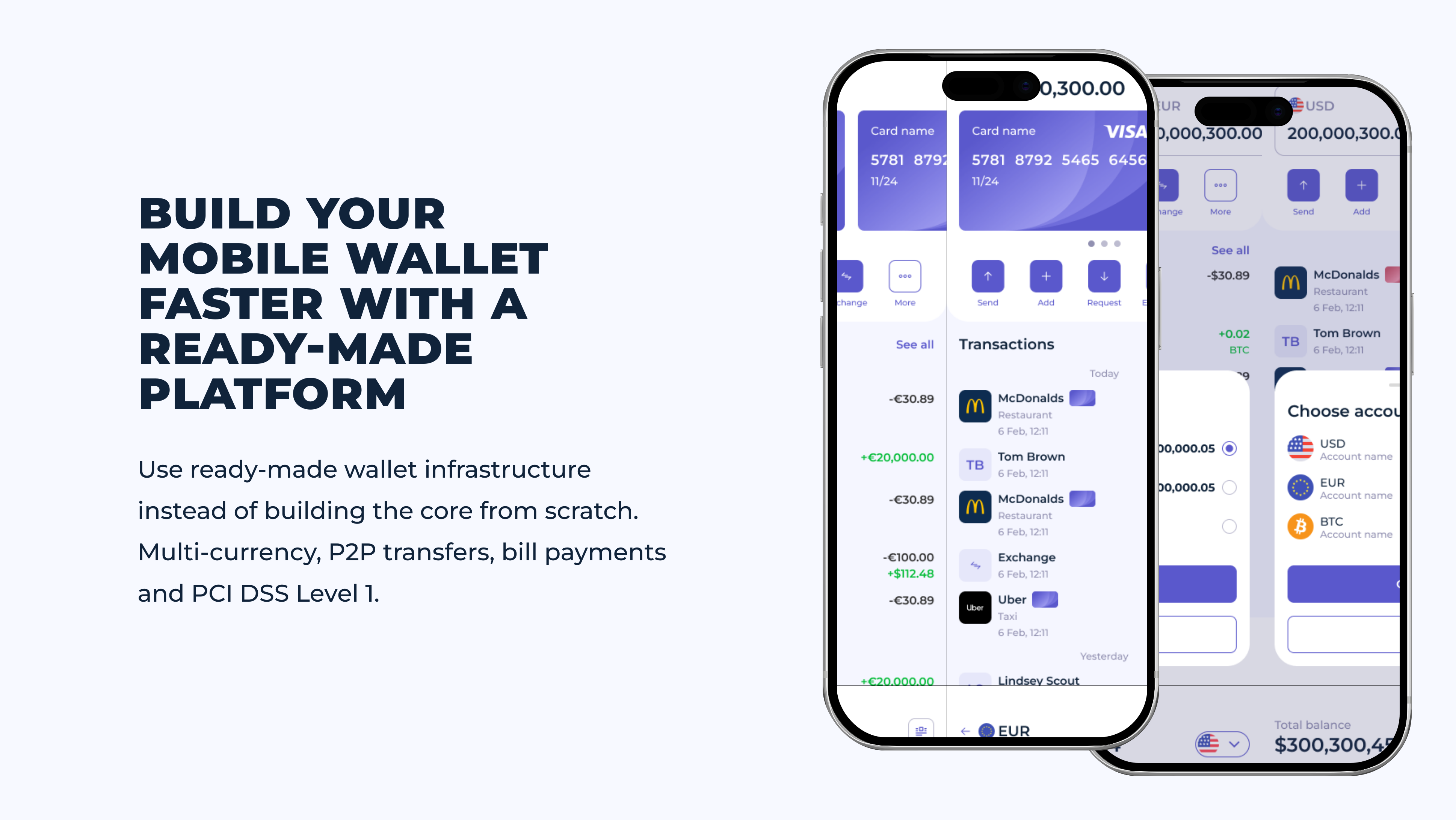
SDK.finance is a modular, API-first FinTech software platform for building digital wallets and payment products. Its white-label mobile wallet solution combines a transaction-processing backend with ready-made mobile and web interfaces, back-office tools, account and balance management, transfers, fees, limits and transaction history.
Instead of developing the wallet infrastructure from scratch, businesses can configure the software, customise the user experience and connect the required KYC, banking and payment providers. SDK.finance provides the technology foundation, while regulatory licences and financial services remain the responsibility of the business and its licensed partners.
With SDK.finance mobile wallet solution, you can provide the following features for your users:
- KYC onboarding in minutes. Identity verification right in the app, no branch visit needed.
- Multi-currency accounts. Hold, convert, and spend multiple currencies in one wallet, all from a single interface.
- Crypto support. Buy, hold, and convert crypto to fiat and back, with digital assets managed alongside regular currency balances in the same wallet.
- Instant card issuance. Issue a virtual or physical card right in the app and control spending limits immediately.
- QR-code payments. Generate or scan a QR code for instant payment, no manual entry of details required.
- One-tap transfers. Send money to a card, account, contact, or IBAN.
- Templates and recurring payments. Set up repeat transfers and save favorite templates for quick access.
- Expense categorization. Transactions are automatically sorted into categories, with a clear dashboard showing the full spending picture.
- Multilingual interface. Switch the app’s language on the fly, so the same wallet feels native to users in different markets.
- Transaction fees and limits management. Set commission types (flat fee, %-based, or tiered by amount range) and control different commission ranges to maximise revenue.
- Currencies management. Control currency exchange rate input, manual or automated via external feed, and manage currency and issuer creation.
- CRM & customer support. Verify customer profile information, manage KYC, view a default log of customer activity, and control customer account status.
- Transaction history. Check all of a customer’s transactions across every status.
- Contracts management. Group fees and limits into a “contract” and build a set of tariffs for customers to choose from.
- 650+ API endpoints. Connect with third-party services through 650+ digital wallet API endpoints, so you can extend and integrate the platform as your business needs grow.
Whether it makes more sense to build this backend from scratch or start from a ready-made platform usually comes down to a few factors: how much of your team’s time you want to spend on ledger and compliance plumbing versus your own product, how quickly you need a working pilot, and how much control you need over source code and deployment.
Building from scratch gives you full control but means owning the accounts, ledger, and integration layer described above yourself; a ready-made transaction platform such as SDK.finance’s trades some of that from-scratch flexibility for a faster start, with source-code access still available if you need deeper control later.
MPAY Case study
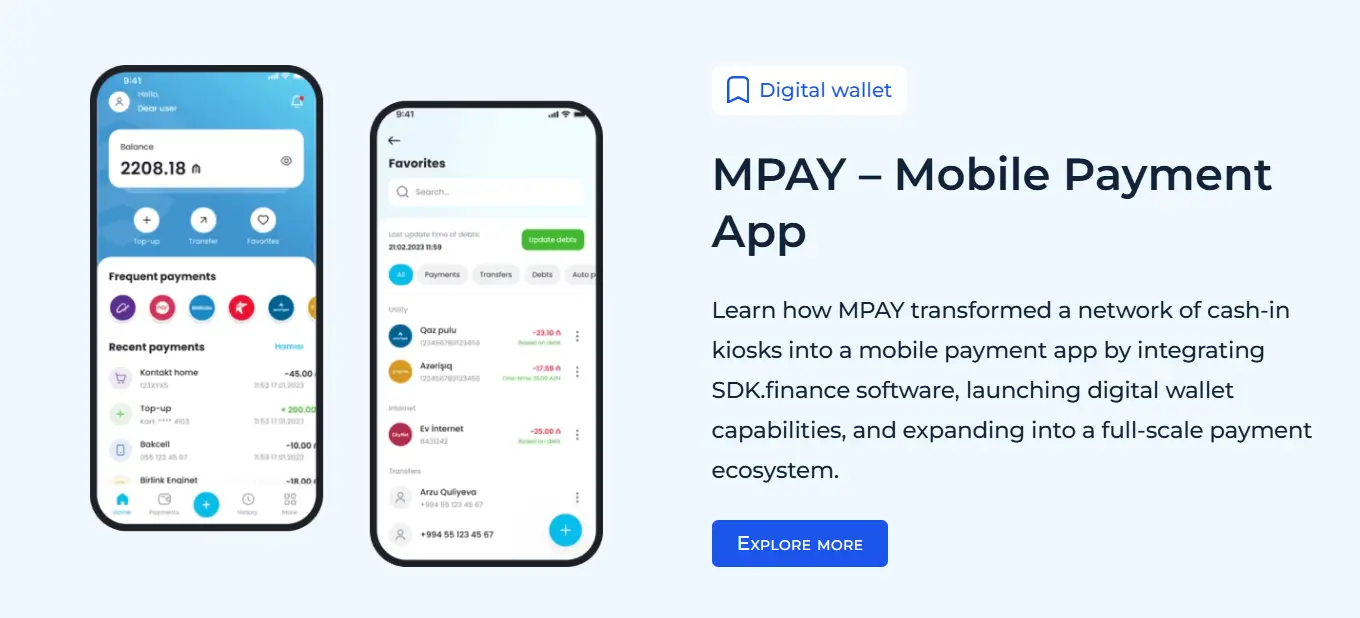
MPAY, a business built around a network of cash-in payment kiosks across Azerbaijan and abroad, is a concrete example of this trade-off. Instead of building a wallet’s account, ledger, and integration layer from zero, MPAY started from SDK.finance’s ledger layer with full source-code access, then merged its kiosk network with e-commerce functionality and extended it into Apple and Android apps – giving customers a single account across multiple vendors and currencies.
The ledger layer underneath handled the pieces described above: a multi-asset general ledger, back-office account administration, role-based access control, and payment gateway integrations, giving MPAY the foundation to scale from offline kiosks into an online, multi-platform wallet business. Read the full MPAY case study for how the implementation was structured.
Conclusion
Mobile app development requires a significant investment of time, resources, and expertise, but it can be a valuable tool for businesses and consumers alike. By following the steps outlined in this guide, businesses can successfully speed up the app development process and launch a high-quality mobile wallet app that meets the needs of their target audience.
Ready backend, APIs, and integrations
Talk to Our Team