


We are excited to introduce the new SDK.finance AI Product Assistant, now available to all users directly in the admin panel and in our demo environment.
You can ask the assistant how to complete a task in the admin panel, find the right API operation among 650+ APIs, understand a product feature, or clarify how a particular process works. It uses SDK.finance product documentation, the public OpenAPI specification, and product video transcripts to provide clear and relevant answers.
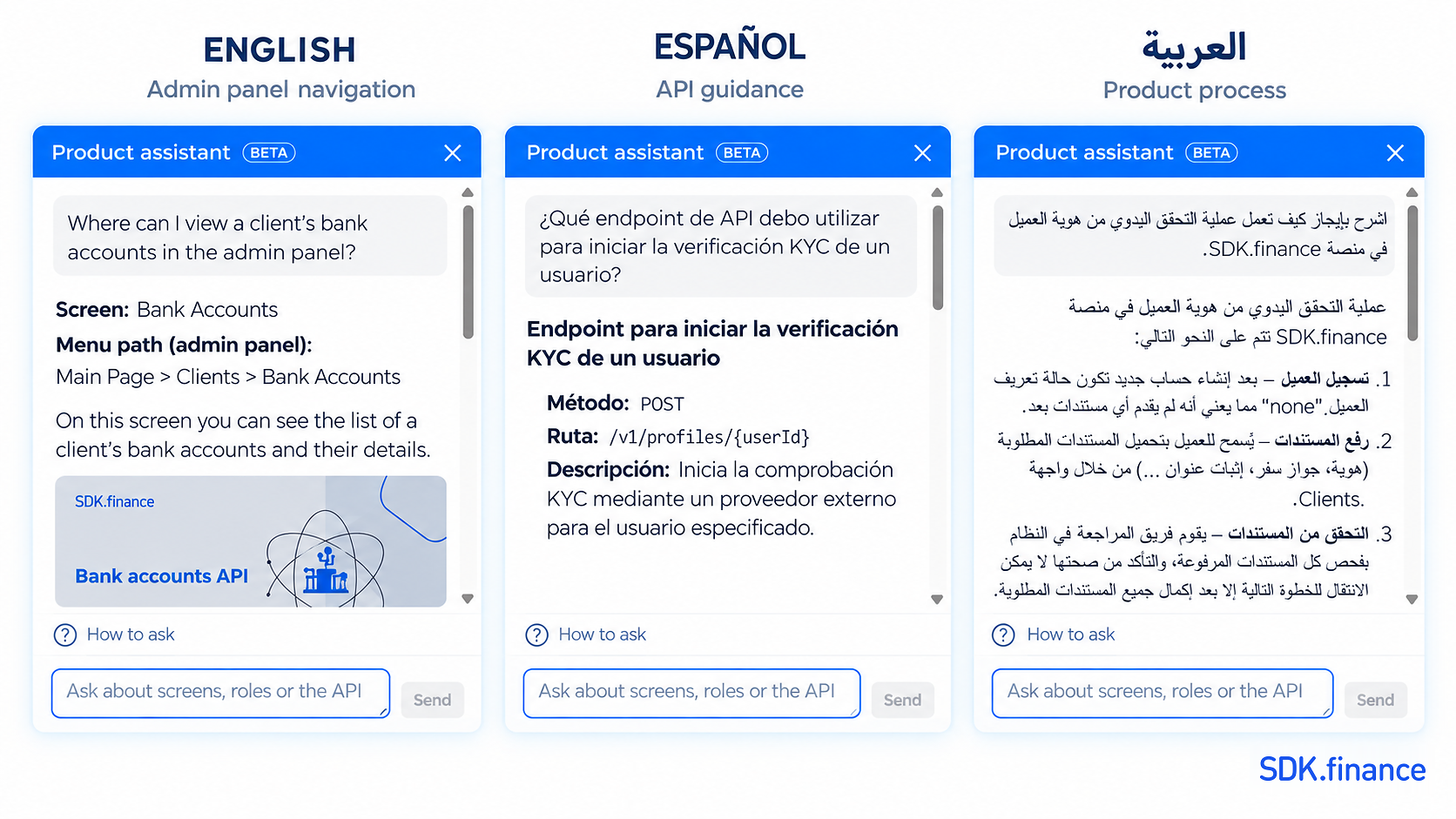
Ask a question in your preferred language, and the assistant will respond in the same language. Whether you use English, Ukrainian, Spanish, Arabic, or another language, you can get the product guidance you need without searching through multiple documentation pages.
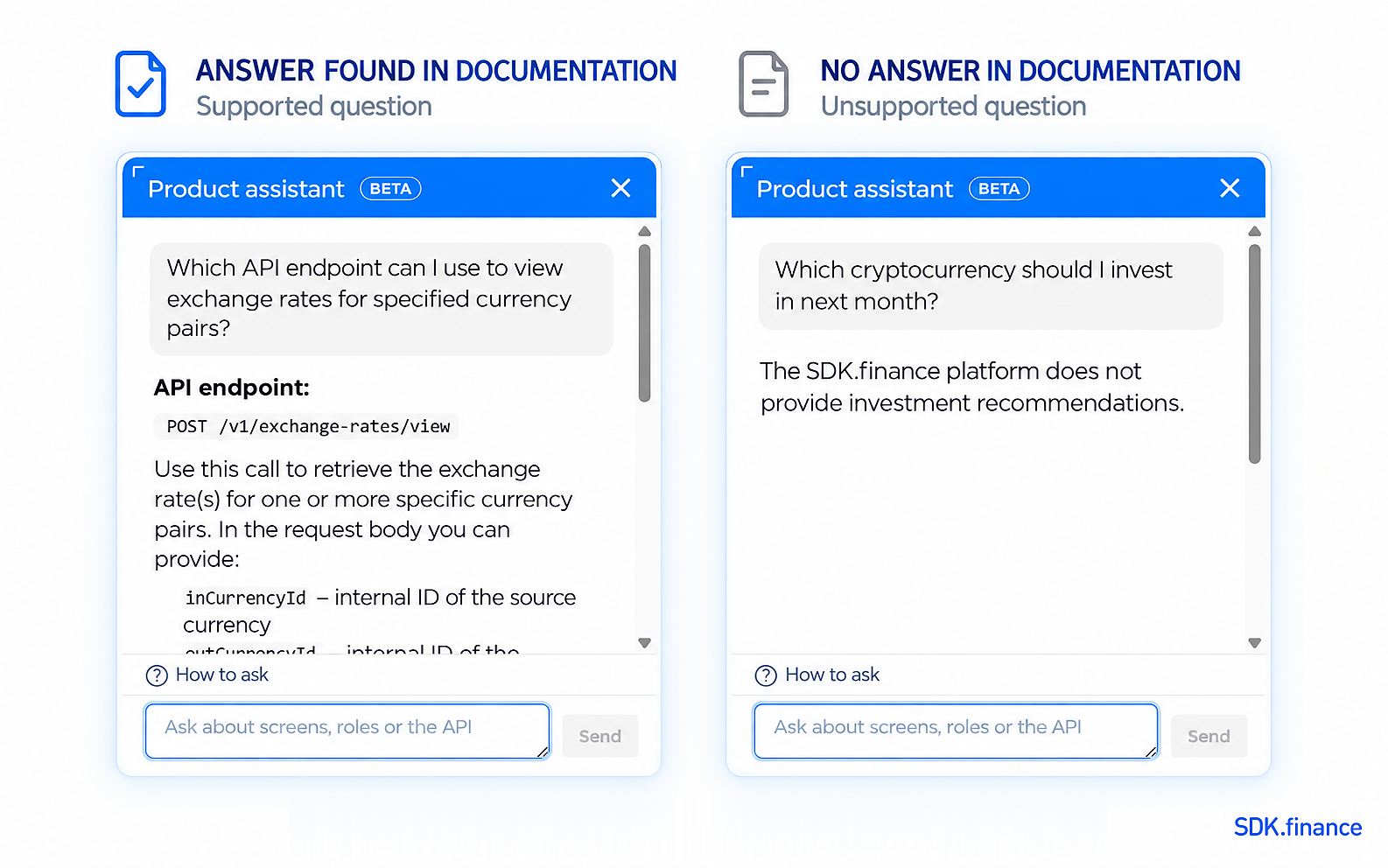
The assistant responds within one to two seconds and provides a relevant answer on the first attempt in 99.9% of cases. If the available SDK.finance documentation does not contain enough information, it will tell you instead of generating an unsupported answer.
In this article, we share our experience of building the SDK.finance AI Product Assistant, from the first low-code RAG prototype to a custom, documentation-grounded system. We explain the challenges we encountered, the solutions that worked, and the engineering decisions that helped us make the assistant fast, multilingual, and reliable.
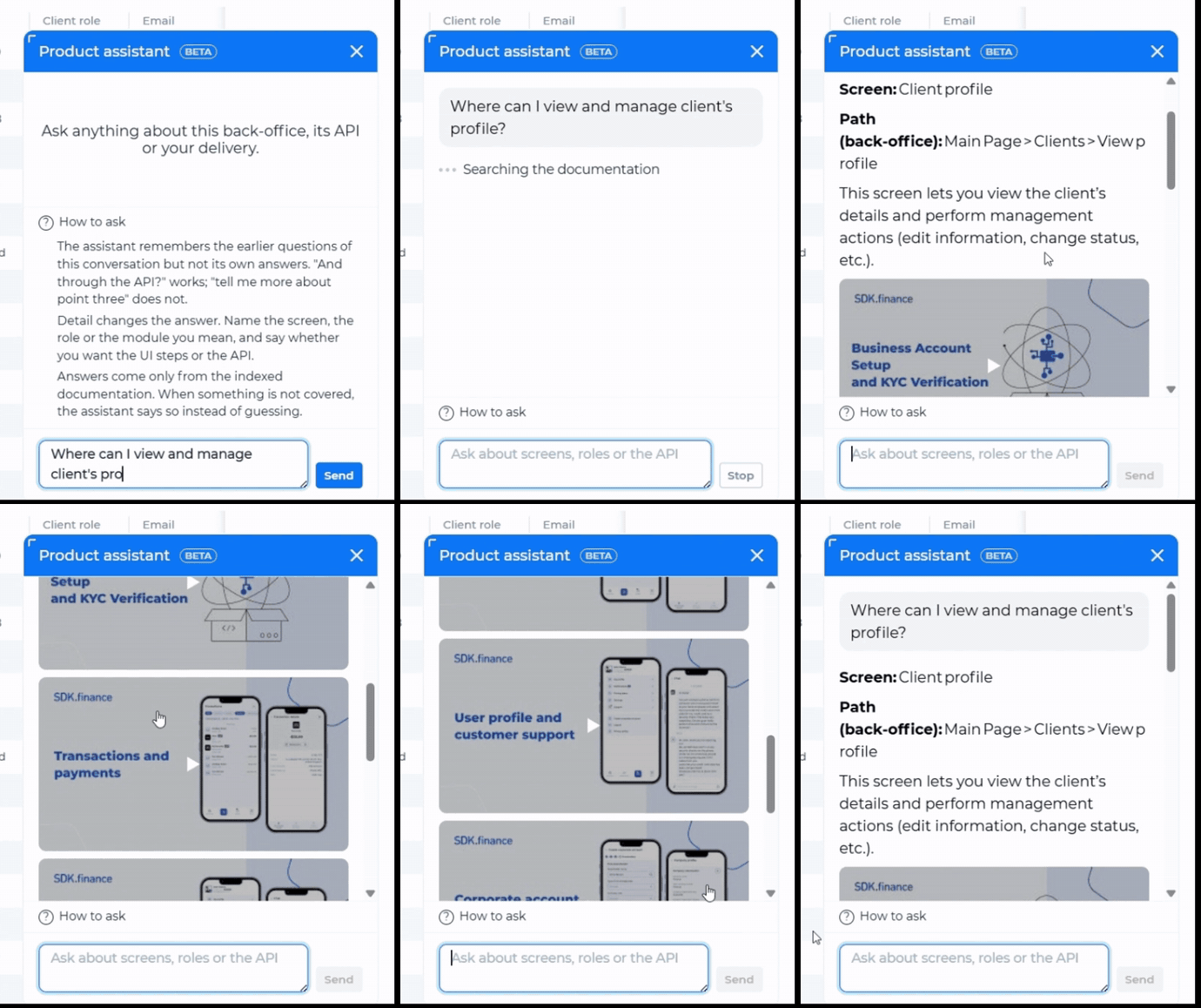
The SDK.finance AI Product Assistant provides contextual answers directly in the admin panel.
Different users need different answers
People approach SDK.finance with different goals.
A user working in the admin panel usually needs to complete a specific task immediately. They do not want to search through dozens of documentation pages. They need a concise instruction: where to go, what to select, and what should happen next.
A developer working on an integration needs the appropriate API operation, required parameters, request structure, and relevant constraints. With 650+ APIs available, finding the correct operation can be difficult without knowing its exact name.
A manager, analyst, or sales representative may need a higher-level explanation: whether the platform supports a particular scenario, how a process works, or how two product concepts differ.
Before the assistant, users had to search the documentation or contact support. Search is less effective when someone describes a task in their own words instead of using the platform’s terminology, while many questions reaching support are already answered in the documentation.
Our goal was practical: give each user the kind of answer they need.
-
For an admin panel user: “Go here and follow these steps.”
-
For a developer: “This is the API operation, and this is what it accepts.”
-
For a manager: “The platform supports this scenario, and this is how it works.”
The assistant also removes a language barrier. It identifies the language of the question and responds in that language, so users do not have to translate requests into English.
The knowledge behind the assistant
The assistant retrieves information from three types of public SDK.finance resources:
-
public product documentation in Confluence;
-
the public OpenAPI specification;
-
transcripts of SDK.finance product videos, which sometimes contain explanations not present in written documentation.
The knowledge index contains no internal documents or client data; it is built exclusively from publicly available SDK.finance resources. User questions are stored separately and used to evaluate answer quality, identify documentation gaps, and improve both the assistant and the platform experience.
For every question, the system retrieves a relevant subset of the indexed sources. The answer-generation model receives only that context. If retrieval cannot find sufficiently relevant information, the generation model is not called and the assistant says that it does not know the answer.
This behavior is central to the product. An incomplete answer may be inconvenient; an invented one can be misleading because it sounds credible enough to act on.
Why the prototype was not enough
We built the first version with an off-the-shelf low-code RAG platform. It let us connect sources, retrieval, and a language model quickly and validate the concept.
The limitations appeared when we progressed from a small proof of concept to the full documentation corpus.
Generic connectors lost structure
Standard connectors tend to treat documents as plain text. Our sources require more context-aware processing.
Confluence pages contain headings, panels, tables, macros, and formatting metadata. Removing this structure can leave an accurate sentence without enough context to interpret it.
OpenAPI presents a different challenge. It is not a linear document: a field description can be several $ref levels away from the operation using it. Generic ingestion can therefore lose the relationship between an endpoint, its request body, and the relevant schemas.
Fixed-size chunking broke information apart
Splitting every document after a fixed number of characters performs poorly on structured technical content. The description of a single API field can be divided between two chunks. Both may look relevant during retrieval, while neither contains the complete answer.
Indexing could fail silently
Full indexing revealed less visible problems. The platform interface could fail during long runs, while one component silently processed only the first item in a list. A successful-looking pipeline could therefore produce an incomplete index.
By then, parsing, chunking, indexing, and parts of retrieval already depended on custom logic. We moved configuration into the database, prompts into files and the admin console, and rebuilt the pipeline around the SDK.finance knowledge base.
Building an index that understands its sources
The algorithms themselves are not unusual. What matters is that the parsers understand the characteristics of each source.
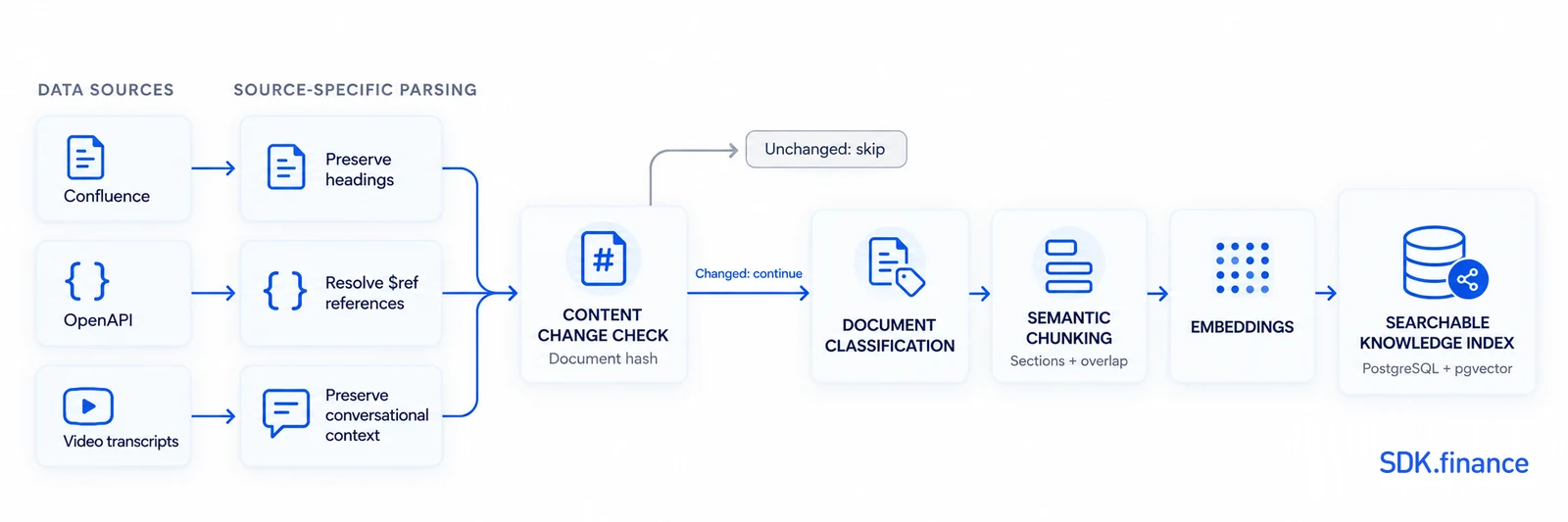
For Confluence, we remove service markup and macros while preserving the heading hierarchy so retrieved fragments retain their meaning.
For OpenAPI, each operation becomes a self-contained document. The parser resolves the necessary $ref references, keeping request bodies and schema fields with the operation that uses them. This allows a retrieved document to answer a focused question such as: “Which API operation should I use to create a user?”
Video transcripts have little of the hierarchy found in written documentation. We process them separately to avoid isolated fragments with no indication of what the speaker was discussing.
Our splitter first looks for semantic boundaries such as sections and paragraphs. Neighboring chunks overlap slightly so context is not lost. Indexing is also incremental: a content hash ensures that unchanged documents do not need to be parsed, split, or embedded again.
In our current configuration, chunks are approximately 900 characters long, with a small overlap between neighboring fragments. Larger chunks can mix unrelated topics, while smaller ones may separate individual statements from the context needed to interpret them.
We also limit the retrieved context sent to the answer model to approximately 48,000 characters. This prevents answers from being truncated when the combined source material approaches the model’s effective context limit.
What happens when a user asks a question
The assistant does more than send the user’s text to a language model. Almost every layer exists because of a problem we observed in real questions.
1. Identify the question type
Initially, one prompt and retrieval strategy handled every request. This caused release notes to appear in roughly a third of answers even when the user had not asked about a specific version. Release notes are dense with feature names, parameters, and configuration keys, which can make them look highly relevant to vector search.
The current pipeline identifies the question type first. This determines which document groups participate in retrieval and which additional instructions are used to generate the response. It does not decide whether the assistant is allowed to answer; that still depends on the retrieved evidence.
2. Rewrite the query in product terminology
Users and documentation authors do not always describe a concept in the same words. The system searches with both the original question and a rewritten version using terminology closer to the documentation. This is useful when someone understands the task but has not yet learned the platform’s internal vocabulary.
3. Retrieve the most useful sources
Vector similarity finds documents that resemble a query semantically, but it does not always identify the document containing the answer. A page may repeat the correct terms while discussing another scenario.
The pipeline can apply an additional ranking step. It remains disabled by default because the model tested on our corpus did not measurably improve results. We add inference steps only when evaluation justifies them.
4. Decide whether there is enough evidence
At first, we tried to prevent hallucinations through prompting: when the sources did not contain an answer, the model was instructed to say so. This was not reliable enough. A language model could still construct a plausible response to an unrelated question.
We therefore moved the decision outside the prompt. If retrieval does not find sufficiently relevant information, the answer model is never called.
5. Generate and validate the answer
Prompts alone also proved insufficient. The model occasionally produced tables unsuitable for the chat panel or convincing links that did not exist.
This led to one of the project’s most important lessons:
If something is critical for correctness, it is better to enforce it in code than to rely on the prompt alone.
The current pipeline applies deterministic checks after generation:
-
tables are converted into lists suitable for the interface;
-
referenced API endpoints are verified against the OpenAPI specification;
-
if a generated URL does not appear in the retrieved sources, the text remains but the unsupported link is removed.
Checks should not silently change meaning. We make a detected limitation visible rather than replace one potentially incorrect answer with another.
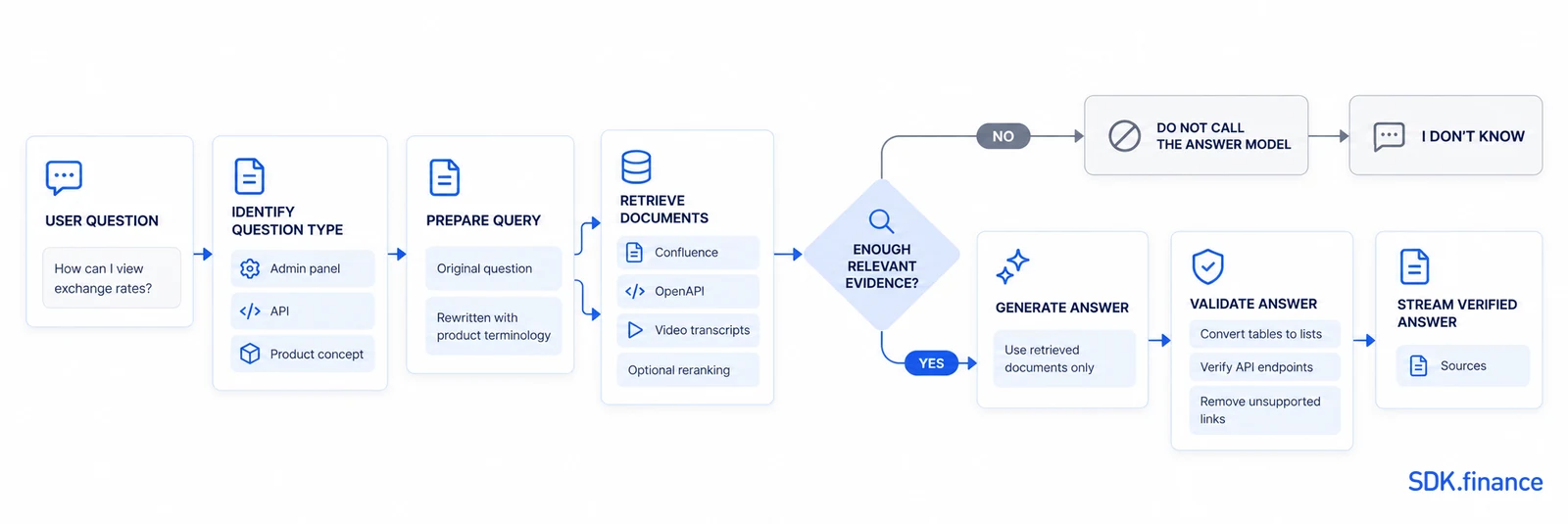
The question is classified and rewritten, relevant evidence is retrieved, and an answer is generated only when the available sources support it.
Read-only by design
The assistant explains the product; it does not operate it. It cannot create users, initiate transactions, or modify configuration. Its role is to explain what should be done and where to do it.
This boundary keeps the experience predictable and the user in control of every operation.
Observability: understanding every answer
An internal admin console allows our team to configure models, prompts, sources, retrieval settings, and background jobs without a new release. It also traces the original query, question type, retrieved documents, model context, generated response, and post-processing changes.
When an answer is wrong, these traces show whether the problem originated in the source, parser, retrieval, prompt, generation, or validation. Otherwise, every failure can look like the same generic “AI problem.”
A simple, model-agnostic stack
The assistant runs on a deliberately compact, model-agnostic architecture built with TypeScript, Node.js, Fastify, PostgreSQL, and pgvector. Separate, independently replaceable models handle embeddings, question analysis, classification, answer generation, and optional reranking. Responses are streamed directly to the widget.
The production setup consists of only two containers: PostgreSQL and the gateway service. The admin console is built with Vue and served by the same service, which keeps deployment and maintenance straightforward.
Model names, endpoints, temperatures, and timeouts are configuration values rather than hard-coded dependencies. Each model role can therefore be changed independently through the admin console without restarting the service.
How we evaluate quality
We do not reduce quality to one universal score. LLM-as-a-judge can help compare runs, but its score alone cannot show whether an answer is useful, grounded, and safe to follow.
Instead, we evaluate the system with real user questions and preserve the way people ask them, including spelling mistakes, vague wording, unfamiliar terminology, and one-word requests.
The assistant provides a relevant response on the first attempt in 99.9% of cases. Re-running real questions helps us detect regressions, improve retrieval, identify documentation gaps, and find parts of the product that need to become more intuitive.
Automated tests protect against known failure modes. But some of the most valuable issues emerge from questions nobody anticipated when the original test cases were written.
What we learned
The most important result is not simply that the assistant can answer, but that it can recognize when it should not. This required source-aware parsing, controlled retrieval, pre-generation relevance checks, deterministic validation, and observability.
The project produced several practical improvements:
-
product knowledge is available directly inside the SDK.finance platform;
-
users receive fast, relevant answers directly within their workflow;
-
users receive answers in the language in which they ask;
-
different question types receive more appropriate sources and instructions;
-
unchanged documents are not repeatedly reprocessed;
-
real questions help improve the assistant, documentation, and platform experience.
A useful AI product assistant is more than a language model connected to a vector database. Its quality depends on how well the complete system understands sources, limits unsupported generation, exposes failures, and handles real questions.
What comes next
We plan to complement vector retrieval with lexical search. Embeddings perform well when a question and a document express the same idea in different words. Lexical methods such as BM25 are often better for exact endpoint names, configuration keys, identifiers, and operation names.
We also plan to refine document segmentation and compare previous and current answers to the same real questions, making improvements and regressions easier to identify.
For SDK.finance users, this means less time spent searching for information and faster access to the product knowledge needed to complete a task or integration.
The goal is not to make the assistant answer every question. It is to make it increasingly effective at finding the answers SDK.finance can support and increasingly dependable when the right response is: “I don’t know.”
See the SDK.finance platform and its built-in AI product assistant in action. Request a demo.

