What are QR code payments?
QR code payments are transactions initiated when a smartphone camera or payment app scans a Quick Response (QR) code encoding payment data or a payment link. The code is the interface, not the payment rail: the connected card network, wallet or bank-transfer scheme determines how the transaction is authorised, priced and settled.
The code can represent either side: a merchant can display a code encoding its account details and, optionally, an amount, or a consumer can display a code from a wallet app for the merchant to scan. Either way, the same chain applies: QR code → payment data or link → app or checkout → transaction platform or PSP → provider or rail → authorisation → ledger and reconciliation. Treating the code as if it were the rail is the most common source of confusion around fees, speed and security.
How do QR code payments work?
A QR code payment moves through five stages: generation or display, scan, payee and amount confirmation, authorisation through the underlying rail, and a ledger update with a receipt.
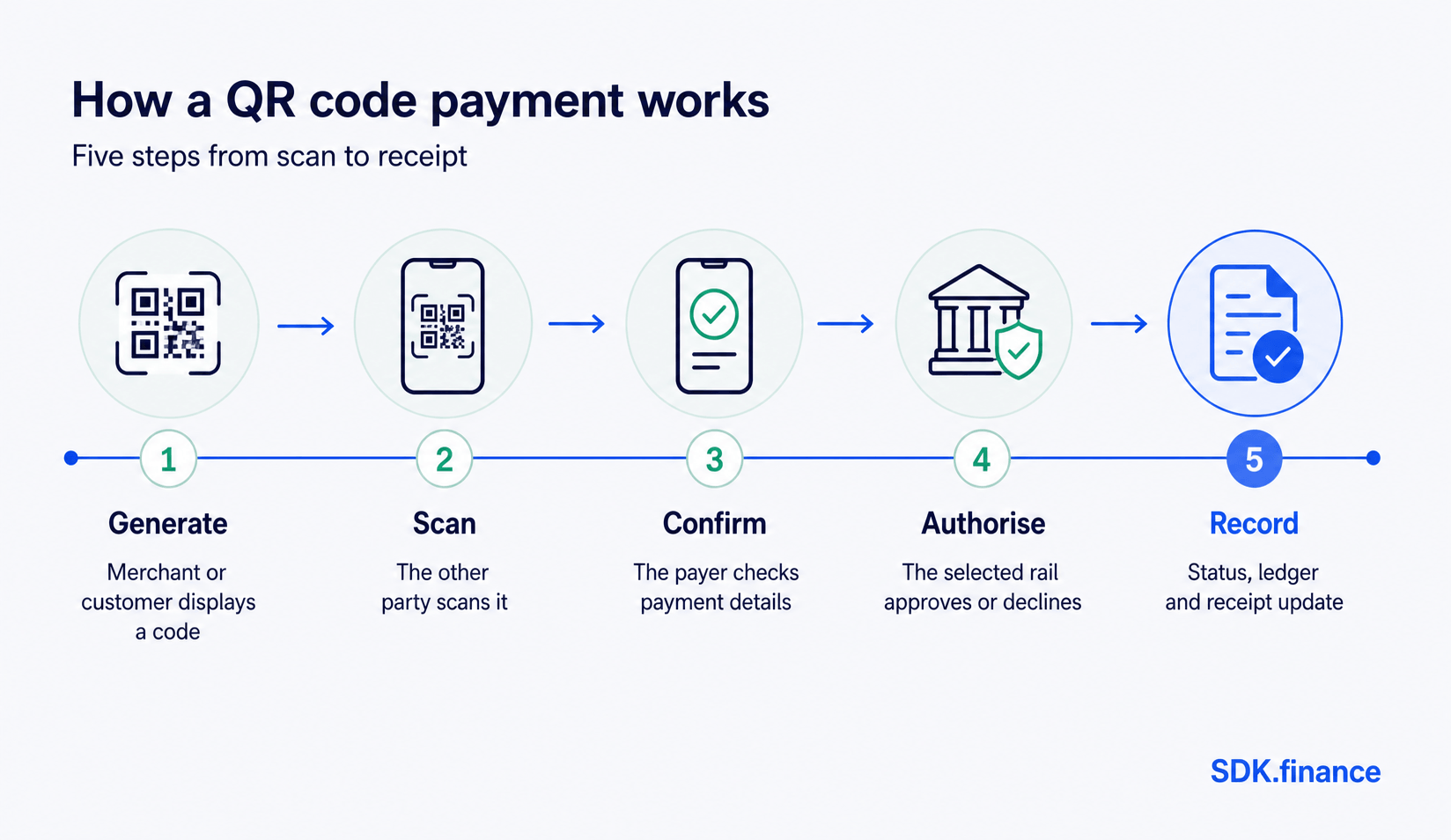
- Generation or display. A merchant generates a static or dynamic code, or a consumer displays one from a wallet app.
- Scan. The other party scans it with a smartphone camera or connected scanner.
- Payee and amount confirmation. The app decodes the payee, currency and amount, and the payer confirms before anything is sent.
- Authorisation. The request routes through the selected rail – a card network, wallet issuer, or A2A/open banking provider – which checks funds and risk, then approves or declines it.
- Status, ledger and receipt. The provider returns a status, the platform updates its ledger, and both parties get a receipt. Settlement follows on the rail’s own timeline and can happen after checkout confirmation, not within it.
Merchant-presented vs consumer-presented QR codes
EMVCo, which publishes the specifications most QR payment schemes reference, defines two acceptance models: Merchant-Presented Mode (MPM), where the merchant displays the code and the customer scans it, and Consumer-Presented Mode (CPM), where the customer displays a code and the merchant scans it.
| Merchant-presented (MPM) | Consumer-presented (CPM) | |
|---|---|---|
| Who displays the code | Merchant | Customer |
| Who scans | Customer | Merchant |
| Typical hardware | Printed code or screen at checkout – no card terminal needed | A scanner or camera at the till, similar to a barcode reader |
| Fits well | Low-cost, low-footfall acceptance points | Wallet-led checkout where the provider controls more of the experience |
A business can support both, depending on channel and device availability.
Static vs dynamic QR codes
A static QR code encodes fixed data – typically a merchant or account identifier – and does not change between transactions. A dynamic QR code encodes transaction-specific data, generated fresh for each sale, and can include the exact amount, a reference and an expiry.
| Static QR code | Dynamic QR code | |
|---|---|---|
| Data encoded | Fixed merchant or account identifier | Amount, reference and expiry, generated per transaction |
| Amount entry | Manual, by the payer | Pre-filled in the code |
| Reconciliation | No unique per-payment reference | A unique reference simplifies matching to an order |
| Misuse risk | Harder to detect if copied or swapped, since it never changes | Typically expires, limiting the exposure window |
Static codes are cheaper to produce and print once; dynamic codes need a connected device to generate each one but remove manual entry and its errors.
What is inside a QR code payment system?
A QR code payment system is more than the code and a scanning app: it is a set of connected layers – an interface, a QR generation and reading service, a transaction platform or PSP that applies business rules, an external provider or rail that authorises and moves funds, risk controls, and a ledger that records and reconciles the result.
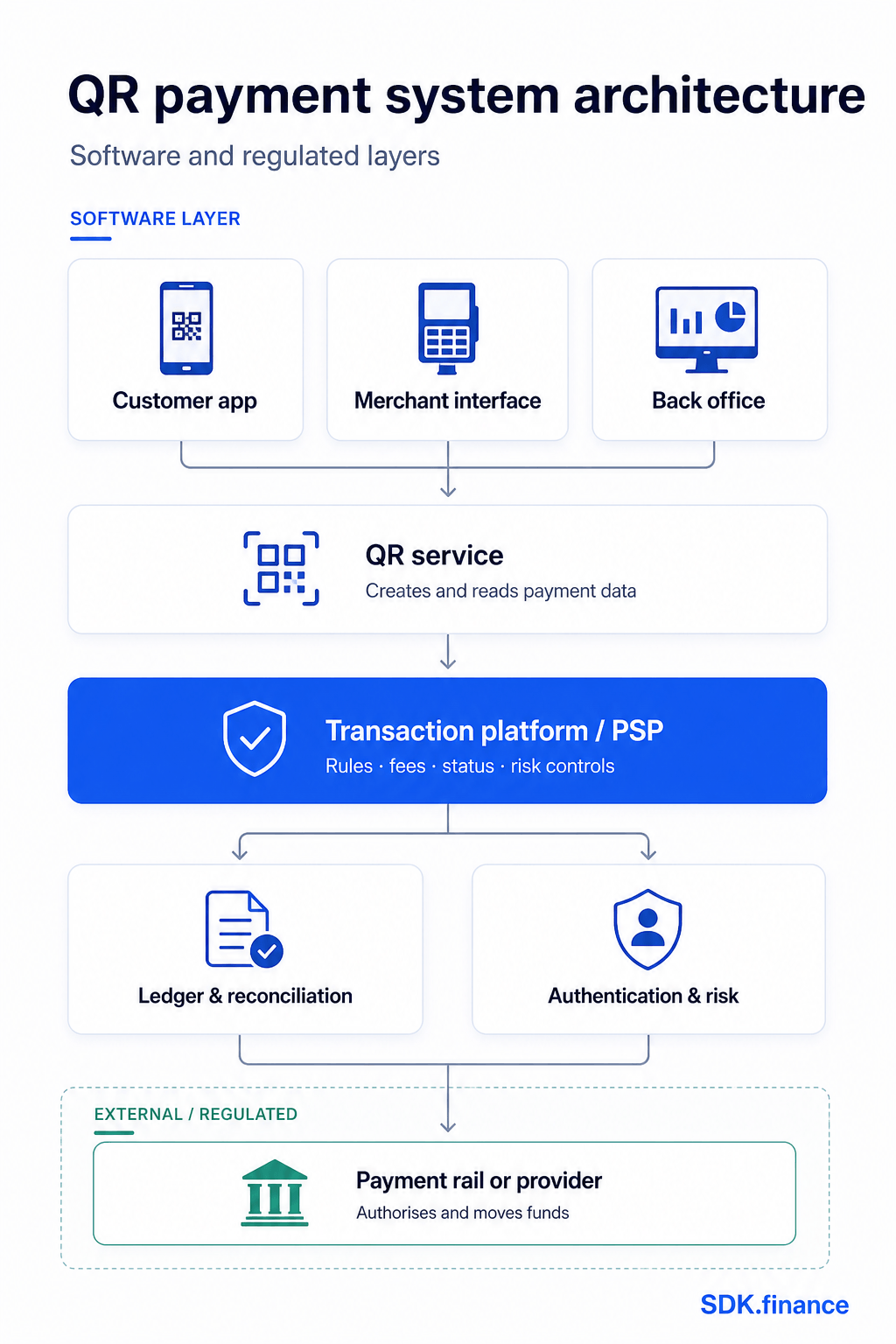
- Customer or merchant interface. The app, web checkout or point-of-sale screen where the code is generated, displayed or scanned.
- QR service. Encodes payment data into a code (regenerating it per transaction for dynamic codes) and decodes a scanned code back into structured data.
- Transaction platform or PSP. Applies fees, limits and rules; creates the request; tracks status; routes it to the right provider.
- External provider or payment rail. The card network, wallet issuer, bank or open banking provider that authorises and moves funds – outside the software platform.
- Authentication and risk controls. Device checks, biometrics, velocity limits and fraud screening before or during authorisation.
- Ledger and reconciliation. Double-entry records matched against the provider’s settlement report to confirm internal and external records agree.
- Notifications and back office. Status updates to both apps, plus tooling for support, exceptions and reporting.
Each layer can sit with a different party: a software platform manages the interface, QR service, transaction logic and ledger; a licensed bank, EMI or payment institution supplies the regulated rail underneath. For the general pattern behind these layers, see SDK.finance’s guide to payment processing system architecture.
Benefits of QR code payments
QR code payments can lower acceptance costs for merchants, reduce checkout friction for customers, and give providers a low-hardware way to reach new segments – but every benefit depends on the rail, provider pricing and merchant setup, not on QR scanning itself.
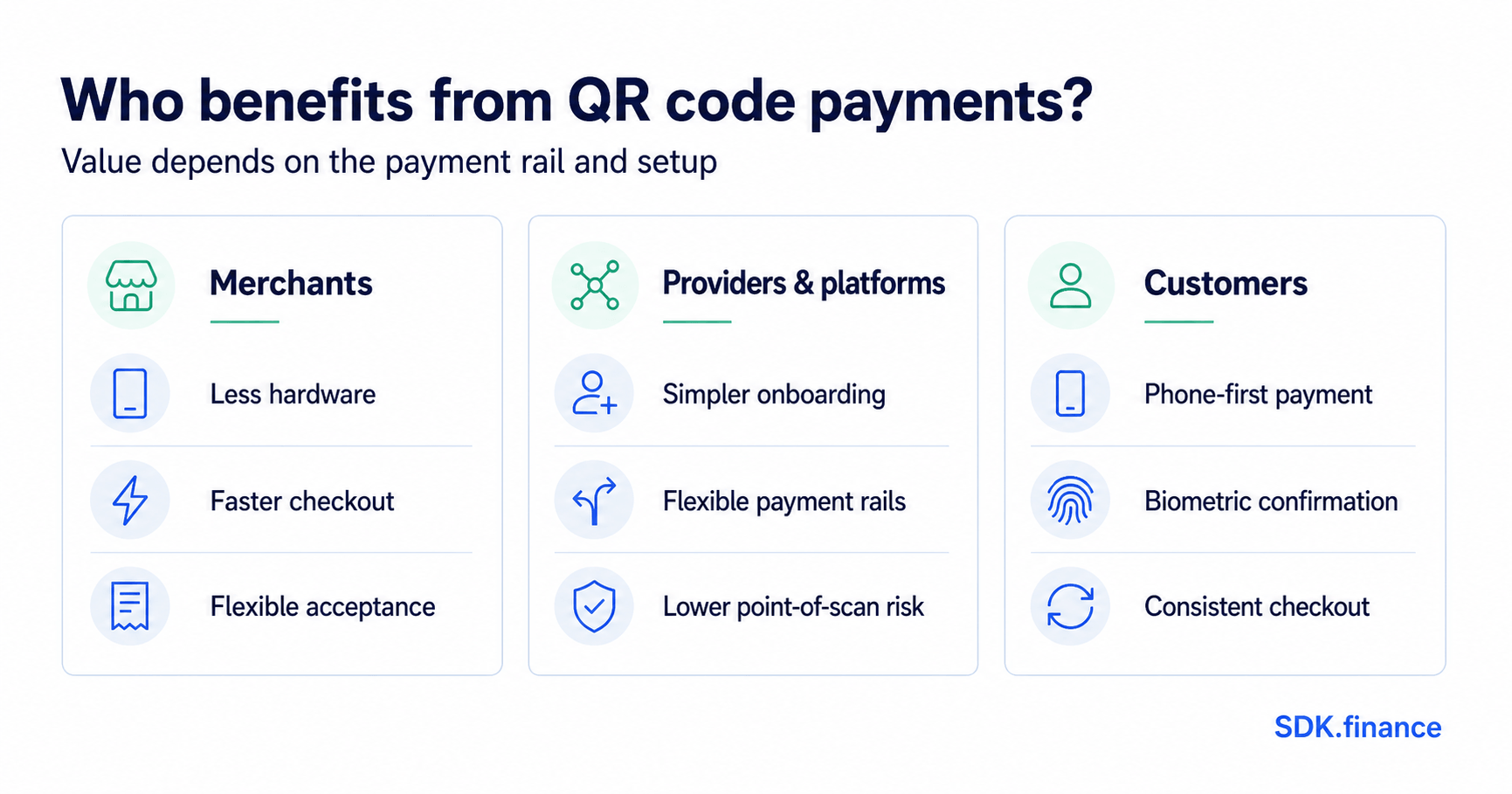
For merchants:
- Lower hardware requirements. A displayed code can replace a card terminal in some models – depending on the acceptance mode and provider pricing, not on QR codes as such.
- Faster checkout for some flows. Removing manual card entry can shorten checkout; it does not itself change how quickly funds settle, a separate, rail-dependent process.
- Simple deployment across touchpoints. A code can be added to a receipt, invoice or table without new hardware.
For providers and platforms:
- Lower-friction onboarding for A2A and wallet rails. QR scanning gives account-to-account and wallet methods a checkout experience comparable to cards, without a card scheme relationship.
- Smaller physical fraud surface at the point of scan. No card number changes hands during the scan, though this does not remove digital risks such as spoofed codes.
For customers:
- No card or cash needed. A payment can be completed with a phone already in hand.
- Built-in device authentication. Biometric or passcode checks add confirmation before the app sends the request.
Risks and controls in QR code payments
QR code payments introduce risks distinct from cards and cash, mainly around the code being replaced, misread or misused – each has a corresponding control, and none is solved by the QR format alone.
| Risk | Control |
|---|---|
| Code replacement (“quishing”) – a sticker covers a legitimate code | Tamper-evident placement, regular inspection, and dynamic codes that are harder to swap |
| Spoofed payee – the payer cannot easily verify who they are paying | Display the payee and amount at confirmation; support payee verification where the rail offers it |
| Static-code entry errors | Prefer dynamic codes for variable amounts; validate entered amounts |
| Replay or duplicate submission | Idempotency keys and unique references so a repeat scan cannot double-charge |
| Device or account compromise | Device authentication, session limits and risk-based step-up checks |
| Failed or ambiguous confirmation | Timeout logic so the ledger and provider status settle an unresolved transaction |
| Refunds and disputes | A refund workflow linked to the original transaction – QR payments have no chargeback mechanics unless the rail provides them |
| Interoperability gaps | Standards-based formats (such as EMVCo’s) and confirmed provider compatibility before launch |
The US Federal Trade Commission has warned that scammers cover legitimate codes with fraudulent versions or send codes leading to spoofed login pages or malware, and recommends checking a URL before opening it. These controls sit within a broader payment fraud prevention programme, not in place of one.
QR payment adoption and standards
QR payment adoption is well established in several major markets but has no single global standard – EMVCo publishes interoperable specifications some schemes adopt, while other markets run national or scheme-specific formats.
EMVCo’s specifications define common data formats for Merchant- and Consumer-Presented Mode, but leave messaging and settlement to the providers involved, so adopting the format alone does not create interoperability between unrelated providers.
In the UK and EU, QR payments ride on adjacent infrastructure rather than dedicated QR regulation: open banking APIs and instant-payment schemes supply the rail, and the EU’s Instant Payments Regulation added verification-of-payee obligations for euro-area providers from 9 October 2025, without mandating a QR format – see SDK.finance’s overview of real-time payments. North America remains fragmented across wallet ecosystems, so a code from one app will not necessarily work with another’s.
How to implement QR payments
Implementing QR payments is a sequence of decisions, not a single integration: the use case and presentation mode, the underlying rail and provider, static or dynamic codes, and the data model, security, reconciliation and monitoring built around them before testing and launch. These sit inside the wider decisions in SDK.finance’s guide to designing a payment system.
- Use case and presentation mode. Merchant-presented, consumer-presented, or both – based on channel and device availability.
- Rail and provider. The card network, wallet or A2A/open banking provider that authorises and settles the payment, since this sets fees, speed and coverage.
- Static or dynamic codes. Based on whether amounts vary and whether reconciliation needs a unique reference.
- Data model. What the code encodes – payee, amount, currency, reference, expiry – consistent with the rail’s specification.
- Security. Tamper-evident placement, payee verification, device authentication and fraud screening from the outset.
- UX and accessibility. A scan-to-confirmation flow that works across lighting and devices, with a manual-entry fallback.
- Refunds and disputes. A workflow linking refunds to the original transaction and the rail’s dispute process.
- Reconciliation. Every transaction carries the identifiers needed to match internal records against the provider’s report.
- Monitoring. Scan failures, timeouts and decline rates tracked as operational signals, not just fraud signals.
- Testing and regulatory review. Test timeouts, duplicate scans and delayed callbacks, and confirm the rail and data handling meet local requirements.
How SDK.finance supports the payment product
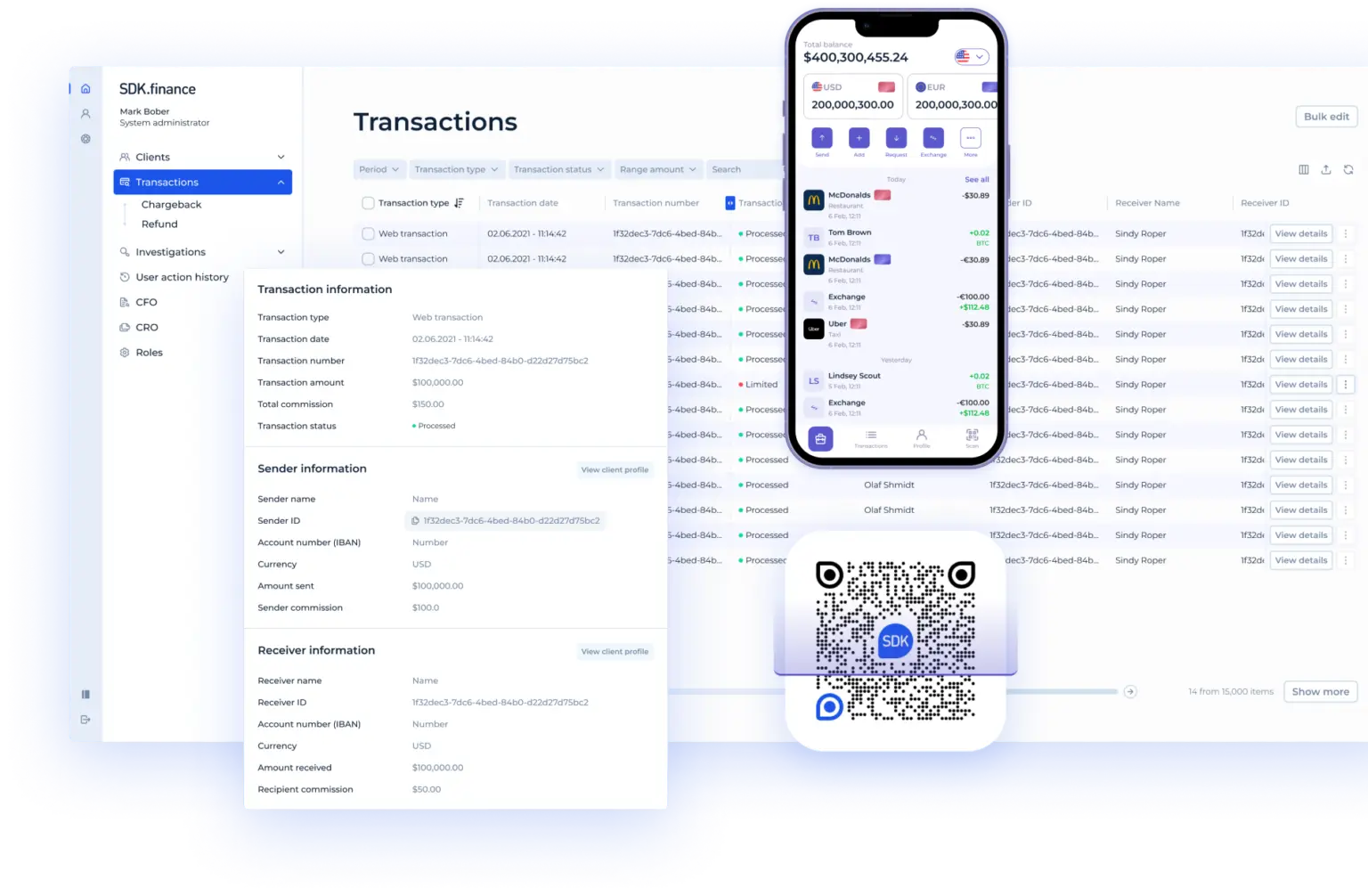
SDK.finance provides software for financial products; it is not a bank, acquirer, card scheme, open banking provider or payment rail. Availability and outcomes for any QR payment journey depend on the delivery model, integrations selected, the customer’s setup and the regulated partners involved.
Within that scope, the public SDK.finance Platform lists payment links and QR code payments, offline QR acceptance, transaction processing, merchant workflows and integration options. Relevant to a QR-initiated payment journey specifically:
- Payment links, QR code payments and offline acceptance. A payment request a customer completes by link or by scanning a code, including where the merchant has limited connectivity.
- Transaction processing and merchant workflows. Create and track the request, apply fees and limits, and run acceptance, refunds and settlement.
- Multi-currency accounts, real-time ledger and configurable fees. Double-entry records reconciled against the provider’s report, with fees and limits set per merchant or channel.
- Back office, roles and permissions. Monitor status, investigate exceptions, and manage refunds and disputes.
- 650+ APIs and webhooks. Connect KYC, card, wallet or open banking providers, with real-time status events as a payment moves through the flow.
- Pre-built, brandable web and mobile interfaces. The screens where a code is generated, displayed, scanned or confirmed.
In practice, SDK.finance sits between the customer- or merchant-facing interface and the external provider: handling the transaction record, merchant accounts, fee logic, monitoring and reconciliation, and connecting to the KYC, card, wallet or open banking providers the product needs through its payment and financial-provider integrations. Regulated authorisation, settlement and licensing stay with the relevant bank, EMI, payment institution or scheme.
QR code payments, in summary
QR code payments are a scanning interface, not a payment rail: cost, speed and security depend on the card network, wallet or A2A provider behind the code, and on how carefully the system is implemented. Choosing the right presentation mode, deciding between static and dynamic codes, pairing every risk with a control, and building proper reconciliation matter more than the QR format itself.
Explore SDK.finance’s payment processing software to see how transaction logic, merchant workflows and provider integrations can support a QR payment journey.
Discover how the SDK.finance TPS can power high-speed, secure operations across banking, fintech, and retail
Talk to Our Team