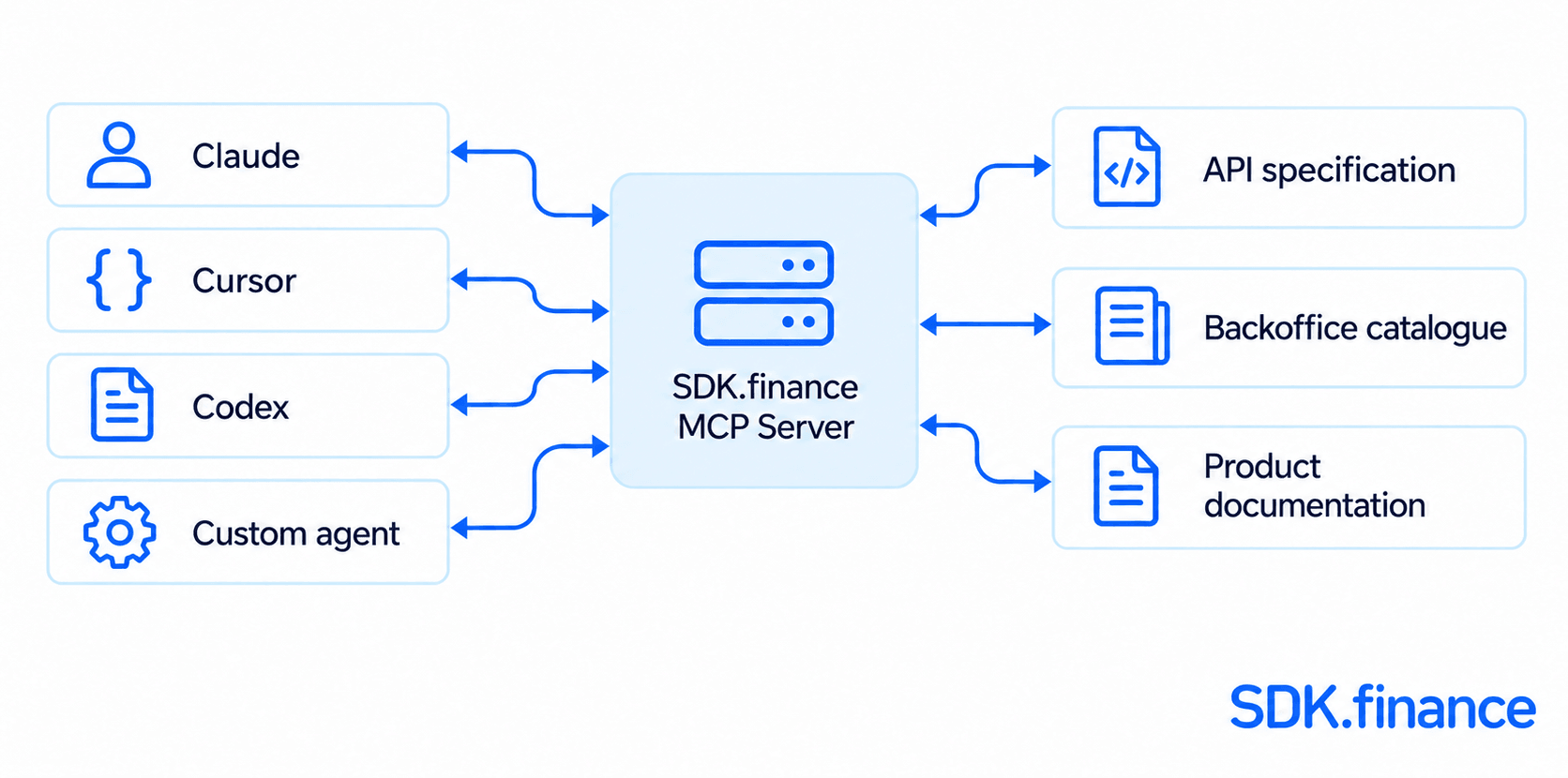
SDK.finance is bringing its product knowledge into the AI tools where teams build. With the launch of the Product Assistant MCP Server, developers, product teams, and systems integrators can connect Claude, Cursor, Codex, and custom agents to documentation about the SDK.finance Transaction Platform.
For teams building with AI, product context matters:
- Which API to call
- How a workflow operates
- Which permissions it requires
The new server makes that knowledge available through the Model Context Protocol (MCP), an open standard for connecting AI agents to tools.
The result is a direct connection between your AI workflow and SDK.finance product knowledge, with tools to retrieve original sources and request answers checked against the product.
Product context for the agentic workflow
Following the introduction of the SDK.finance AI Product Assistant, the MCP server extends access to product knowledge across compatible AI environments. Teams can choose the client they work in and bring SDK.finance context into that workflow.
- A developer can investigate an API while working in an AI coding environment.
- A product analyst can explore a workflow in the conversation where requirements are taking shape.
- A systems integrator can give a custom agent access to SDK.finance documentation through the same MCP endpoint.
The knowledge available through the server includes the API specification, backoffice screen catalogue, product guides, and notes added by an operator.
Bring product knowledge into the work itself
The value of the connection is practical: product questions can be explored alongside the decisions they inform. Teams can use the MCP server to:
- Find relevant API documentation while developing an integration. Ask the agent to retrieve documented operations and inspect their parameters before deciding what to implement.
- Explore documented workflows during product planning. Ask about product capabilities, backoffice navigation, and permissions, then review the supporting sources.
- Check proposed product references. Request a checked answer when you need to establish whether a named API endpoint, screen, menu path, or permission appears in the product sources.
- Add SDK.finance knowledge to a custom agent. Connect an MCP client over Streamable HTTP and call the same search and answer tools from your own workflow.
For example, a developer could ask: “Find the documentation for updating a merchant product. Which fields can be changed?” A product analyst could ask: “Does the documentation cover this workflow? Show the relevant sources.”
Built around sources and product checks
Credible AI-assisted work needs evidence that teams can inspect. The SDK.finance MCP server provides two complementary tools, giving agents a way to find the source material first and request further product checks when needed.
search_documentation: get the source material
search_documentation returns matching documents with their titles, text, and links where available. It doesn’t generate an answer, making it the faster tool with less restrictive rate limits.
This is the starting point for finding an API description or product guide. An explanation your AI client builds from these documents is separate from the server’s checked-answer process.
ask_assistant: resolve uncertainty with product checks
ask_assistant generates an answer and checks the API endpoints, screens, menu paths, and permissions it names against the available specification and catalogue. Names absent from those sources are marked in the answer. Those marks should remain visible when the answer is shared.
The response includes the sources used. If the documentation doesn’t cover the question, the tool says so. These checks help identify unsupported product references, but they don’t guarantee that every part of a generated answer is correct.
This gives teams a clear working pattern: retrieve the evidence, inspect the sources, and request a checked answer where uncertainty remains.
Connect Claude, Cursor, Codex, or your own client
The server is available at:
https://assistant-gtw.sdk.finance/mcpIt uses Streamable HTTP and requires no authentication. Claude Code, Claude Desktop, Cursor, and Codex have documented connection options. Other clients can connect if they support the required transport.
For Cursor and clients that use this MCP configuration format, add:
{
  "mcpServers": {
    "sdk-finance": {
      "url": "https://assistant-gtw.sdk.finance/mcp"
    }
  }
}
Setup details vary by client. In Claude Desktop, enable the connector for the conversation after adding it. In Codex, set tool_timeout_sec = 130, as a checked answer may take longer than the default tool timeout. Custom clients should check isError before using a tool result.
The connection guide includes client-specific instructions, tool parameters, and troubleshooting.
A defined scope for confident adoption
The MCP server provides product knowledge. It contains no customer data, account data, or live information from an installation, and its tools don’t execute platform operations or change configuration.
Questions are recorded, including what was asked, when, and by which client. Keep credentials, customer information, and confidential implementation details out of prompts.
Searches and checked answers are rate-limited, with tighter limits for checked answers. A checked answer may take up to two minutes. If a call returns 429, wait for the period specified in Retry-After before retrying.
The next chapter in access to product knowledge
With MCP, SDK.finance is making its product knowledge available to the agents and tools teams choose to work with. It is a practical step towards a more connected development experience, where product context is within reach as requirements become implementation decisions.
Connect your AI workflow to SDK.finance. Follow the MCP setup guide, add the server to your client, and explore the product from the environment where you build.
Launch your digital bank in weeks, not years
Talk to Our Team