


Fireblocks integration manual
SDK.finance integrates with Fireblocks as a custody provider for managing blockchain assets. Fireblocks handles the creation of wallet addresses and vault accounts for users, detects incoming on-chain transactions, and executes outgoing withdrawal transactions. The integration enables SDK.finance to support both UTXO-based assets (e.g., Bitcoin) and Account-based assets (e.g., Ethereum) with secure, custody-grade transaction processing.
When a user opens a crypto account in a Fireblocks-enabled asset, SDK.finance calls the Fireblocks API to provision the required vault structure. The exact steps depend on the asset chain type.
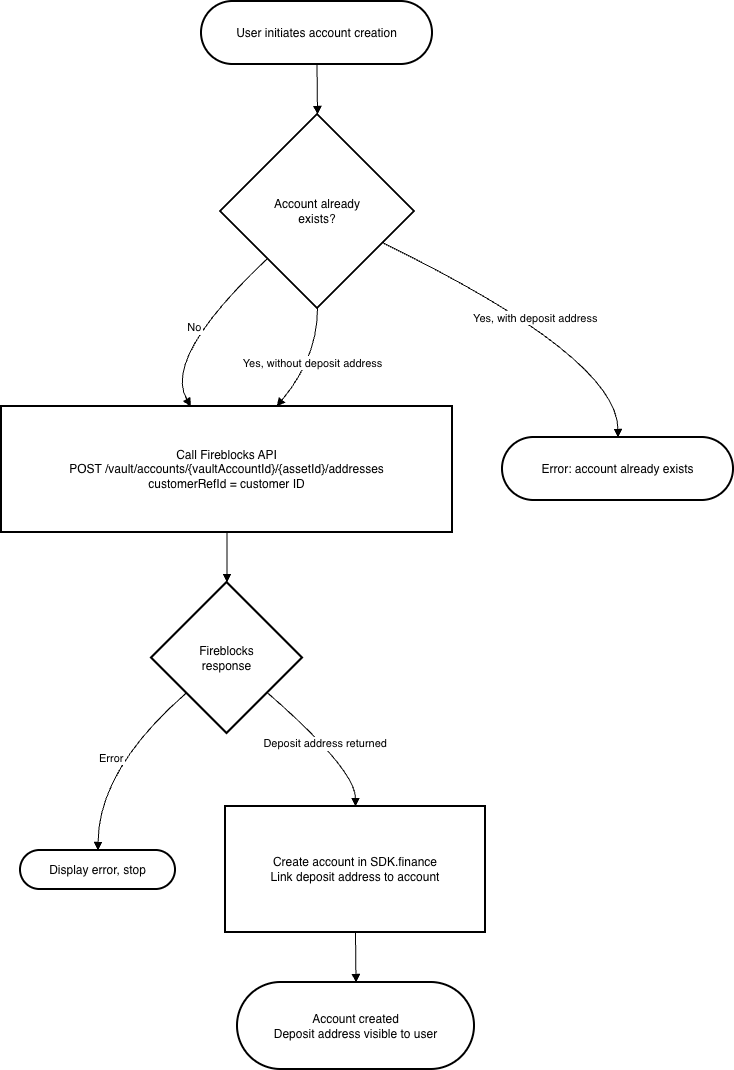
For UTXO-based assets, deposit addresses are created inside the shared Treasury Vault Account in Fireblocks.
Steps:
-
The user initiates account creation for a UTXO-based asset.
-
SDK.finance checks whether the user already has an account for this asset.
-
If an account with a deposit address already exists → an error is returned.
-
If an account exists without a deposit address (e.g. created before Fireblocks was enabled for the asset) → SDK.finance proceeds to step 3.
-
If no account exists → SDK.finance proceeds to step 3.
-
-
SDK.finance calls the Fireblocks API to generate a deposit address within the Treasury Vault Account:
POST /v1/vault/accounts/{vaultAccountId}/{assetId}/addresses, withcustomerRefIdset to the internal SDK.finance customer ID. -
Fireblocks returns the newly generated deposit address.
-
SDK.finance creates the account in SDK.finance and links the deposit address to it.
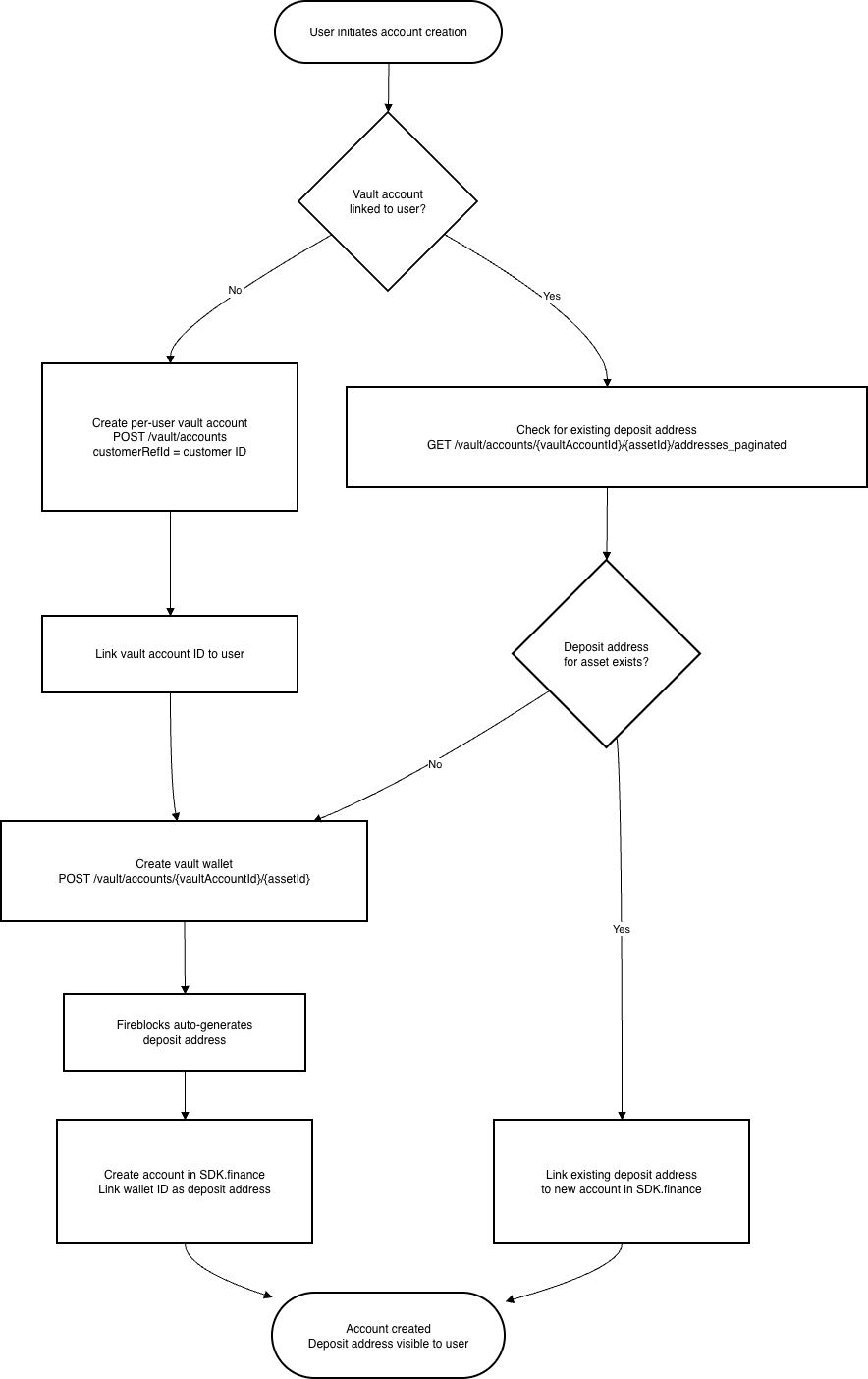
For account-based assets, SDK.finance creates a dedicated per-user vault account in Fireblocks. Each user gets their own vault account, and a separate vault wallet is created within it for each asset.
Steps:
-
The user initiates account creation for an account-based asset.
-
SDK.finance checks whether a Fireblocks vault account is already linked to this user.
-
No vault account exists: SDK.finance calls
POST /v1/vault/accountswithcustomerRefIdset to the internal customer ID. Fireblocks creates the vault account and returns its ID. SDK.finance links the vault account ID to the user, then proceeds to step 3. -
Vault account already exists: SDK.finance calls
GET /vault/accounts/{vaultAccountId}/{assetId}/addresses_paginatedto check whether a deposit address for the selected asset already exists within the vault account.-
If a deposit address is found → proceed to step 4, linking the existing address.
-
If no deposit address is found → proceed to step 3.
-
-
-
SDK.finance creates a vault wallet for the asset inside the user’s vault account:
POST /v1/vault/accounts/{vaultAccountId}/{assetId}. Fireblocks automatically generates a deposit address for the wallet. -
SDK.finance creates the account in SDK.finance and links the vault wallet ID (deposit address) to it.
Deposit flow
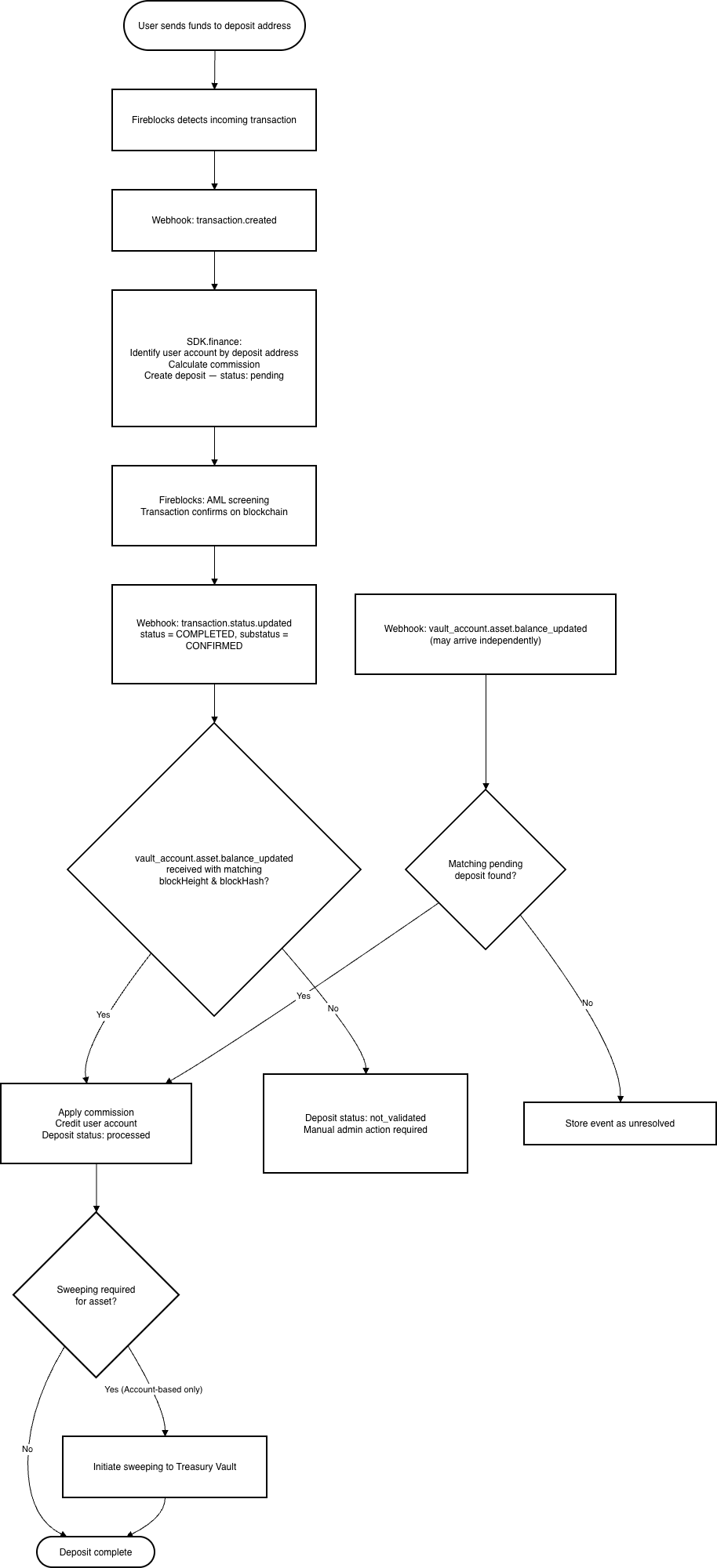
The deposit flow is driven entirely by Fireblocks webhook notifications. SDK.finance does not poll for transaction status — it reacts to incoming webhook events.
Steps:
-
The user sends funds from an external wallet to their Fireblocks-generated deposit address.
-
Fireblocks detects the incoming transaction on the blockchain and sends a
transaction.createdwebhook to SDK.finance. -
SDK.finance receives the webhook, identifies the user account by the destination deposit address, calculates the applicable commission, and creates a deposit transaction in
pendingstatus. The FireblocksresourceIdis stored as the external transaction ID. -
Fireblocks performs AML and policy screening. Once the transaction reaches the required confirmation level on the blockchain, the status changes to
COMPLETEDwith substatusCONFIRMED. -
Fireblocks sends a
transaction.status.updatedwebhook to SDK.finance. -
SDK.finance receives the webhook, verifies that
status = COMPLETEDandsubstatus = CONFIRMED, and looks for a storedvault_account.asset.balance_updatedevent with matchingblockHeightandblockHash:-
Balance update event found: SDK.finance applies the commission, credits the user’s account, and sets the deposit status to
processed. For Account-based assets with sweeping enabled, an omnibus sweeping operation is initiated (see Omnibus sweeping below). -
Balance update event not found: SDK.finance does not credit the user’s account and sets the deposit status to
not_validated. Manual administrator action is required (see Deposit validation below).
-
-
When a
vault_account.asset.balance_updatedevent arrives (which may happen before or aftertransaction.status.updated), SDK.finance stores it and looks for a matching pending deposit transaction byblockHeightandblockHash. If a match is found, it applies the commission, credits the user’s account, and sets the deposit toprocessed.
If the transaction reaches a terminal failure status (CANCELLED, FAILED, or BLOCKED), SDK.finance sets the deposit transaction status to rejected.
Omnibus sweeping (Account-based assets)
After a successful deposit (processed status) in an account-based asset where sweeping is enabled, SDK.finance automatically moves the deposited funds from the user’s vault account into the Treasury Vault Account.
Steps:
-
SDK.finance detects the successful deposit in an account-based asset where sweeping is required.
-
SDK.finance retrieves the user’s vault account ID and the treasury vault account ID from the asset settings, along with the sweepable amount.
-
SDK.finance initiates a sweeping transaction in Fireblocks:
POST /v1/transactions, with source = user’s vault account, destination = treasury vault account. -
Fireblocks creates the sweeping transaction and returns its transaction ID.
-
SDK.finance links the sweeping transaction ID to the deposit record.
-
Fireblocks executes the transfer and sends a
transaction.status.updatedwebhook. -
SDK.finance receives the webhook and, upon
COMPLETED/CONFIRMEDstatus, updates the sweeping status of the deposit toswept.
Sweeping is not required for UTXO-based assets, as their deposit addresses already reside within the Treasury Vault Account.
A sweeping failure does not affect the status of the deposit itself — the deposit remains processed.
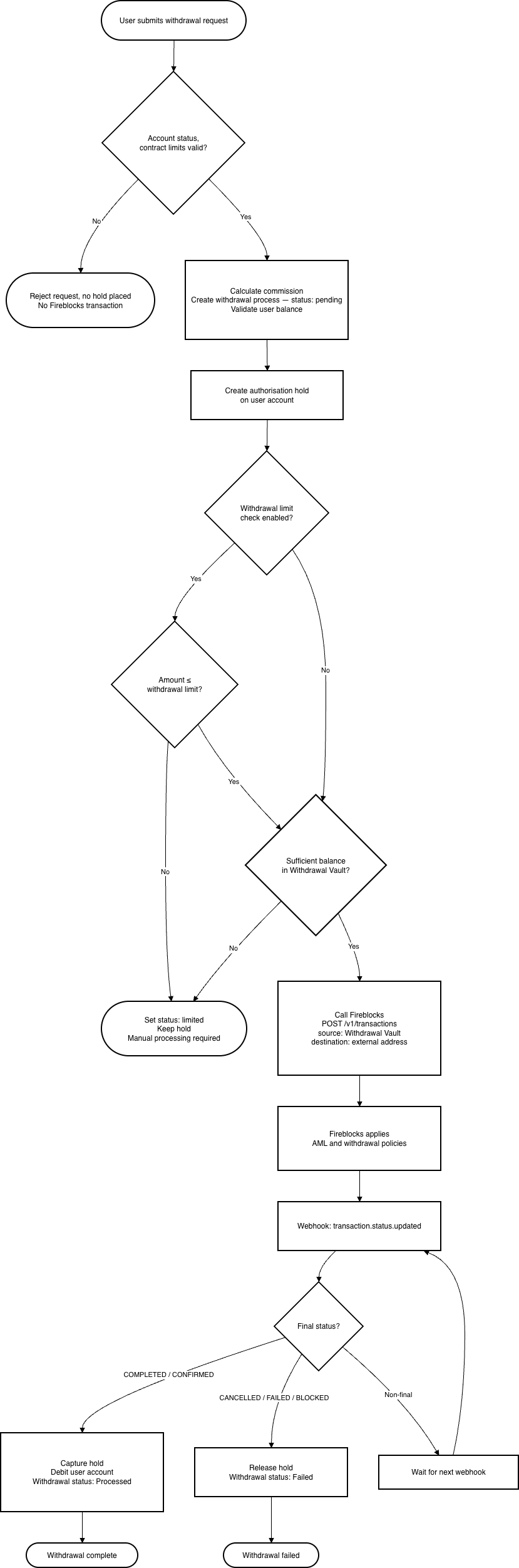
When a user requests a withdrawal, SDK.finance performs a series of validations before calling Fireblocks. The transaction outcome is then tracked via Fireblocks Webhooks v2.
Steps:
-
The user submits a withdrawal request in the SDK.finance mobile application specifying the asset, amount, and destination blockchain address.
-
The following API call is performed to the SDK.finance backend:
POST /api/v1/gate/transactions
{

    "coin": "{{walletNumber}}",

    "amount": 0.01,

    "type": "REDEEM",

    "method": {

        "gateProviderId": "Fireblocks",

        "way": "EMONEY"

    }
SDK.finance backend:
-
validates the request: user account status, contract permissions, and internal contract limits. If any check fails, the request is rejected immediately and no Fireblocks transaction is created.
-
calculates commission, creates a withdrawal business process in
pendingstatus, and validates that the user’s account balance covers the requested amount plus fees. -
creates an authorisation transaction to place a hold on the requested amount in the user’s account.
API returns gateTransactionId
-
When a successful response with
gateTransactionIdis returned, the following API call is performed to the SDK.finance backend:
POST /api/v1/gate/transactions/{gateTransactionId}/submit
{

    "optionName": "default",

    "fields": {

        "withdrawalDestinationAddress": "0x6Cc9397c3B38739daCbfaA68EaD5F5D77Ba5F455"

    }

}
-
withdrawalDestinationAddressmandatory parameter containing the withdrawal destination address provided by user (non-whitelisted / one-time address)
SDK.finance back-end:
-
retrieves the asset settings: whether the withdrawal limit check is enabled, the configured withdrawal limit, and the withdrawal vault account ID.
-
Withdrawal limit check (if enabled): SDK.finance compares the requested amount against the configured safe withdrawal limit.
-
If the amount exceeds the limit → the withdrawal business process status is set to
limited, the hold on the user’s account is kept, and no Fireblocks transaction is created. Manual processing by an administrator is required. -
Liquidity check: SDK.finance retrieves the available balance of the Withdrawal Vault Account via
GET /v1/vault/accounts/{vaultAccountId}. -
If the vault has insufficient balance → the withdrawal business process status is set to
limited, the hold is kept, and no Fireblocks transaction is created. Manual processing is required. -
SDK.finance initiates the withdrawal transaction in Fireblocks:
POST /v1/transactions, with source = Withdrawal Vault Account and destination = the user-supplied external address.
-
Fireblocks applies configured withdrawal policies (AML, TAP, risk scoring, whitelisting) and processes the transaction.
-
Fireblocks sends
transaction.status.updatedwebhook notifications as the transaction progresses. -
SDK.finance processes the final webhook:
-
COMPLETED/CONFIRMED: SDK.finance captures the authorisation transaction (debiting the user’s account) and sets the withdrawal business process status toProcessed. -
CANCELLED,FAILED, orBLOCKED: SDK.finance releases the hold on the user’s account and sets the withdrawal status toFailed. -
Non-final status: SDK.finance takes no action; it waits for the next webhook.
-
The following operations are available for administrators to handle exceptional situations:
|
Operation |
Description |
|---|---|
|
Manual deposit validation |
Occurs when a The administrator first triggers automatic re-validation — SDK.finance searches among already-received webhook events for a matching balance update. If found, the commission is applied, the user account is credited, and the deposit status changes to If the event is still not found, the administrator can explicitly mark the deposit as validated based on external verification (e.g., Fireblocks Console and blockchain explorer); the user account is credited and the transaction is flagged as manually validated for audit purposes. No Fireblocks API call is made during this process. |
|
Manual withdrawal finalisation |
Occurs when a withdrawal is in The administrator verifies the actual withdrawal outcome externally (e.g., via the Fireblocks Console) and selects the final status manually. If success: the held amount on the user account is captured and the withdrawal status changes to If failed: the held amount is released back to the user account and the withdrawal status changes to No Fireblocks API call is made. The action is recorded as manually finalised for audit purposes. |
|
Re-send pending withdrawal |
Occurs when a withdrawal is in The administrator selects the Re-send to Fireblocks action. SDK.finance re-initiates the withdrawal by calling the Fireblocks API ( The held amount on the user account remains in place until a final result is received from Fireblocks. This action must not be used if there is any indication that the withdrawal was already executed in Fireblocks, to avoid creating a duplicate transaction. |
|
Process withdrawal rejected by limit |
Occurs when a withdrawal was automatically blocked during the withdrawal flow because the requested amount exceeded the configured safe withdrawal limit or the Withdrawal Vault Account had insufficient balance (withdrawal status: The administrator manually triggers processing, bypassing the limit and liquidity checks. SDK.finance proceeds with the full withdrawal execution: it calls the Fireblocks API ( If the withdrawal completes successfully, the held amount is captured and the user account is debited. |
|
Cancel withdrawal rejected by limit |
Occurs when a withdrawal was automatically blocked because the requested amount exceeded the safe withdrawal limit or the Withdrawal Vault Account had insufficient balance (withdrawal status: SDK.finance verifies the withdrawal status, releases the held amount on the user account, and marks the withdrawal as No Fireblocks API call is made — no transaction was ever submitted to Fireblocks in this case. |
Configuration
Fireblocks integration is enabled at the system level by configuring instance-level parameters. These changes require a redeployment of the instance and cannot be activated through the admin UI.
The following environment variables must be set:
|
Parameter |
Description |
Environment variable |
|---|---|---|
|
Enable Fireblocks integration |
Activates the Fireblocks integration. When set to |
|
|
Fireblocks API key |
The API key issued in the Fireblocks workspace. Used to authenticate API requests to Fireblocks. Required. |
|
|
Fireblocks base URL |
The base URL of the Fireblocks API. Use the sandbox URL ( |
|
|
Private key |
The RSA private key used for JWT-based API authentication (request signing). Must be in PKCS#8 format, encoded as Base64. Required. |
|
|
JWKS URL |
The URL of the Fireblocks JSON Web Key Set (JWKS) endpoint. Used to validate the cryptographic signature of incoming Fireblocks webhook notifications. |
|
|
Fireblocks webhook endpoint |
The URL path at which SDK.finance exposes its webhook listener for Fireblocks Webhooks v2. This value must be registered as the webhook endpoint URL in the Fireblocks Console (see Step 3). |
|
FIREBLOCKS_INTEGRATION_ENABLED=true

FIREBLOCKS_API_KEY=97aac308-9c5e-4d64-804e-8515aae9dec1

FIREBLOCKS_BASE_URL=https://api.fireblocks.io/v1

FIREBLOCKS_SECRET_KEY=<base64-encoded-pkcs8-private-key>

FIREBLOCKS_JWKS_URL=https://keys.fireblocks.io/.well-known/jwks.json

FIREBLOCKS_WEBHOOK_ENDPOINT=/v1/webhook/fireblocks
Fireblocks integration can only be activated if it is included in the deployed build. If the integration is not part of the build, the configuration parameters are ignored.
SDK.finance uses Kafka to process Fireblocks webhook events asynchronously. The Kafka topics listed below must be created manually before enabling Fireblocks webhooks in any environment. Topics are not created automatically — if they are missing, webhook events will be lost.
|
Purpose |
Configuration property |
Default topic name |
|---|---|---|
|
Fireblocks transaction events |
|
|
|
Fireblocks vault balance updates |
|
|
-
Configuration property:
FIREBLOCKS_WEBHOOK_GROUP_ID -
Default value:
sdk5.local.webhook.fireblocks
This applies to all environments (dev, staging, production, client instances).
Before configuring an asset in SDK.finance, the following must be completed in the Fireblocks Console:
-
Create a Treasury Vault Account — used for consolidated asset storage (receives swept funds from user vault accounts for Account-based assets, and is the shared deposit vault for UTXO-based assets).
-
Create a Withdrawal Vault Account — used as the funding source for outgoing withdrawal transactions (may be the same account as the Treasury Vault Account depending on the Fireblocks vault structure).
-
Create a vault wallet for each supported asset within the Treasury Vault Account.
-
Configure Webhooks v2 in the Fireblocks workspace:
-
Set the webhook endpoint URL to the URL exposed by the SDK.finance instance. The URL is composed of the instance base URL and the path configured in
FIREBLOCKS_WEBHOOK_ENDPOINT(e.g.https://your-instance.example.com/v1/webhook/fireblocks). -
Enable the following event types:
-
|
Event type |
How it is used by SDK.finance |
|---|---|
|
|
Received when a new transaction is detected in Fireblocks. SDK.finance records the event and begins tracking the transaction. |
|
|
Received when a transaction’s status changes. Used to detect when a deposit reaches COMPLETED/CONFIRMED status, triggering the deposit crediting flow. Also used to track the outcome of initiated withdrawal transactions. |
|
|
Received when the balance of a vault account asset is updated on-chain. Used together with |
Step 4 — Asset-level configuration (SDK.finance Back-office UI)
Once the system-level integration is enabled, an administrator configures Fireblocks for each supported asset via the Admin UI (Assets section). The following parameters are available per asset:
|
Parameter |
Description |
|---|---|
|
Enable Fireblocks integration |
Enables Fireblocks as the custody provider for this asset. |
|
Provider |
Select Fireblocks (currently the only available provider). |
|
Fireblocks Asset ID |
The asset identifier used in Fireblocks (e.g., |
|
Asset chain type |
The blockchain architecture of the asset: UTXO-based, Tag/Memo-based, or Account-based. Determines how deposit addresses and vault accounts are created. |
|
Treasury Vault Account ID |
The ID of the Fireblocks vault account used for consolidated asset storage. |
|
Withdrawal Vault Account ID |
The ID of the Fireblocks vault account used as the source for outgoing withdrawals. |
|
Sweeping required |
Whether deposited funds should be swept from per-user vault accounts into the Treasury Vault Account after each deposit. Applicable to Account-based assets only. |
|
Safe withdrawal limit |
The maximum withdrawal amount that can be processed automatically. Withdrawals exceeding this amount are rejected and require manual processing. |
|
Check safe withdrawal limit |
Whether the safe withdrawal limit is enforced during the withdrawal flow. |
Once the Fireblocks integration is configured, Fireblocks-based operations (deposits and withdrawals) will only function if the corresponding fees are set up in SDK.finance. If fees are not applied, they should be set to Zero. Two actions are required:
-
Configure fees for the Fireblocks provider — in the Admin UI, define the fee structure for the Fireblocks provider.
-
Add the required operations to the appropriate contracts — each operation that should be available (e.g. deposit, withdrawal) must be added to the relevant contract in SDK.finance.
For step-by-step video instructions on configuring provider fees and contract operations, refer to the SDK.finance knowledge base — Vendors.